
Connect Your Accounts. Keep Your Books Up to Date.
Connect your business bank accounts and credit cards to AgentXpense securely through Plaid. Transactions are imported automatically, AI categorizes them, and your real estate finances stay organized-without entering every transaction by hand.
No credit card required · Statement upload on trial · Plaid on paid plans
What Bank Connections Do for Real Estate Agents
- 1
Connect Your Bank
- 2
Import Transactions
- 3
Auto-Categorize
- 4
Keep Your Books Updated
How Do Bank Connections Simplify Bookkeeping for Realtors and Real Estate Agents?
Bank connections securely link your business bank accounts and credit cards to your bookkeeping software so financial transactions can be imported into your records. For real estate agents, this can reduce manual data entry and make it easier to keep income and business expenses organized throughout the year. With Agent Expense, AI transaction categorization is applied to connected lines as they come in.
TD_Business_Jul2025.csv
Excel · Unsorted
Old way

Chase · Checking
ConnectedWeekly · Read-only · Auto-categorized
Facebook Ads
$680.00Shell Gas
$94.50The Keg Steakhouse
$186.75Office Depot
$52.40AgentXpense
Chase · Checking
Auto-categorizedApplied from vendor and previous activity
Facebook Ads
$680.00TREB Annual Dues
$1,200.00Shell Gas
$94.50The Keg Steakhouse
$186.75Interac Purchase
$52.40Automatic Transaction Categorization
Agent Expense auto-categorizes imported transactions based on your transaction history and vendor information. Categories are applied as the lines come in, so your books stay organized without sorting every transaction by hand.
- AI-powered auto-categorization - Categories are applied from transaction details and history.
- Auto-categorized as they come in - Vendor, amount, date, and category are filled automatically.
- Learns from previous activity - AgentXpense applies the category that matches your books.
Don't Want to Connect Your Bank? Upload and Stay Organized.
If your bank isn't supported or you prefer not to connect an account, you can import your financial activity using supported statement files. Upload a CSV, Excel, or PDF statement and the lines are auto-categorized as they come in.
Upload your bank statement
CSV, Excel, or PDF. Mapping starts after you drop the file.
Choose FileDrop to import
Lines are auto-categorized as they import.
Reading your statement…
Detecting columns and auto-categorizing.
47 transactions auto-categorized
Columns mapped. Categories applied.
TD_Business_Jul2025.csv
CSV · 86 KB
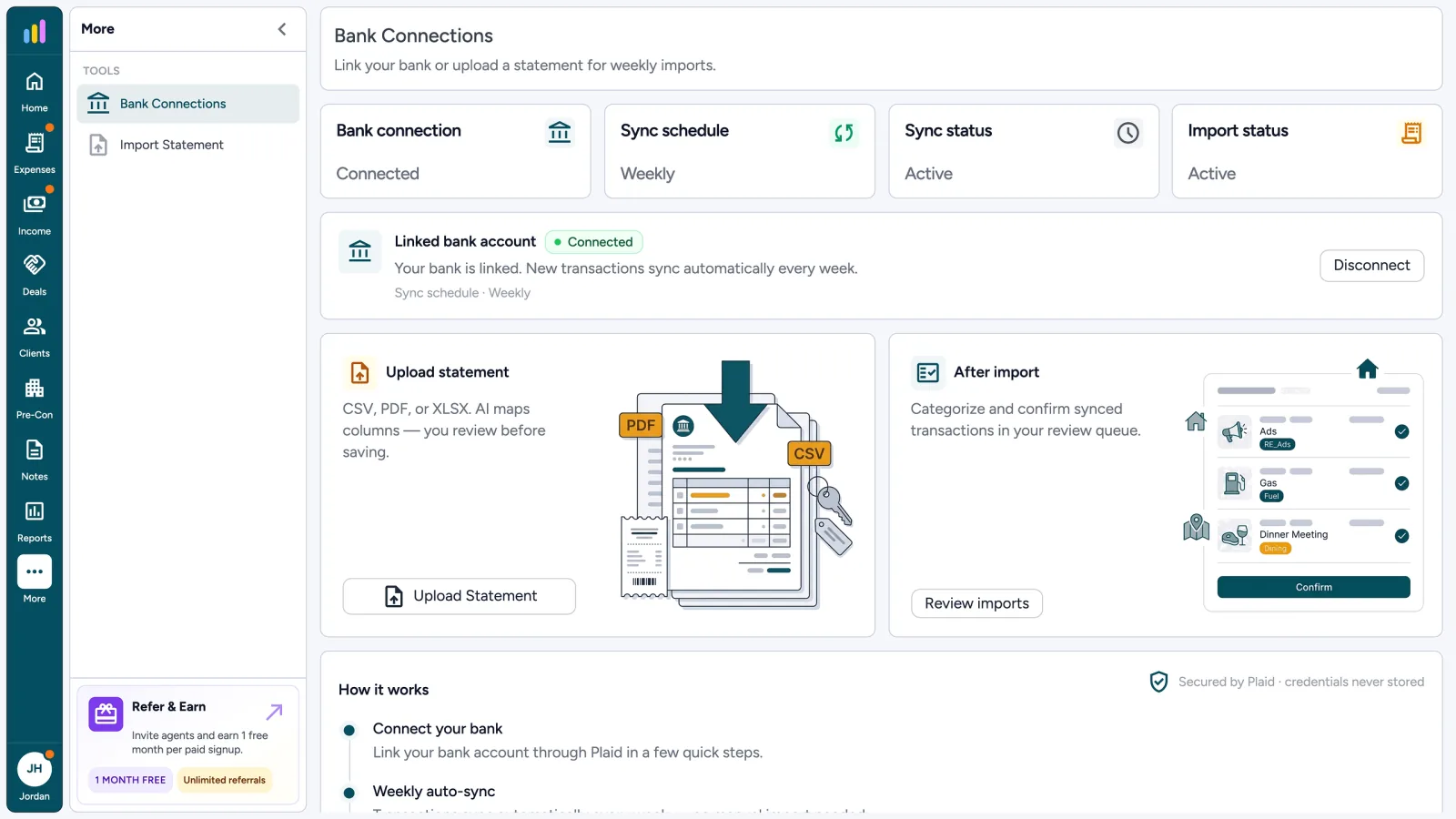
Bank Connections
Link a bank or upload a statement for weekly imports.
Connect bank

Few clicks. Imports ready for review.
Upload statement
CSV, PDF, or XLSX. You review first.
How it works
- 1. Connect through Plaid
- 2. Weekly read-only sync
- 3. Confirm in review queue
Bank Connections
Weekly sync on. Review before books.
Chase · Checking
ConnectedWeekly · Read-only
Review imports
Ready to review
Office Depot
-$42.18Suggested · Office
Mar 4Shell Gas
-$68.90Suggested · Vehicle
Mar 3Home staging
-$250.00Suggested · Marketing
Mar 2Client lunch
-$23.45Needs review · Meals
Mar 1Confirm before books
Select your institution




Agent Xpense uses Plaid
to connect your accounts
Access
Read-only · US & Canada
Secure, Read-Only Bank Connections Through Plaid
Connect your supported bank accounts through Plaid using read-only access. Agent Xpense does not need permission to move money from your connected account. Bank transactions are imported and auto-categorized for your books.
- Read-only bank access
- Secure account connection through Plaid
- Imported transactions are auto-categorized
- Weekly transaction syncing on supported paid plans
- Plaid Link
- Read-only
- US & Canada
- Weekly sync
Import. Categorize. Organize.
- 1
Connect or Import
Connect a supported bank account or upload a statement to bring transactions into Agent Xpense.
- 2
Auto-Categorized
AgentXpense auto-categorizes transactions based on details and previous activity.
- 3
Add to Your Records
Approved transactions become part of your organized income and expense records in Agent Expense.
Bank Statements, Expenses & Bookkeeping Reports
Keep your real estate financial records organized from transaction import through reporting. Upload statements, auto-categorize transactions, and generate reports for your business or accountant.
Bank Connections FAQ for Real Estate Agents
Bank connections link your business bank accounts and credit cards with bookkeeping software so transactions can be imported into your financial records. For real estate agents, this can reduce manual data entry and make it easier to keep income and business expenses organized.
AgentXpense uses Plaid to connect supported financial institutions. The connection is read-only, allowing transaction information to be imported without giving the bookkeeping system permission to move money from your account.
Agent Expense uses Plaid for supported bank connections and read-only access. Your bank connection is used to import transaction information for bookkeeping rather than to initiate payments or transfers.
Supported connected accounts can sync transactions weekly on eligible paid plans. Imported transactions are auto-categorized as they come in.
Yes. If you don't want to connect your bank or your financial institution isn't supported, you can use supported statement imports such as CSV, Excel, or PDF files.
Yes. AI transaction categorization is applied to imported lines based on transaction information, vendor history, and previous activity.
You can connect supported accounts or import statements from the accounts you already use. Each line is auto-categorized and waits in review before it hits your books. AgentXpense does not move money or force you to split banks first.
Yes. Keeping transactions organized and categorized makes your financial records easier to review and can help you prepare reports and supporting records for your accountant.
Connect your bank. Stay organized. Move on.
No credit card required · Statement upload on trial · Plaid on paid plans
Start Free Trial2255 Dundas Street West, Suite 207 Mississauga, ON L5K 1R6
© Agent Xpense Inc. All rights reserved.