
Tax-Ready Reports for Real Estate Agents
Financial reporting software for realtors: see commissions, income, expenses, net income, and sales tax for any date range you choose. Set your sales tax rate once, print a Profit & Loss PDF for your accountant, and export CSVs when you need the raw rows. AgentXpense organizes the numbers; it does not file your return.
No credit card required · 30-day free trial
What Your Reports Screen Shows
- 1
Commissions & Net Income
- 2
Category Profit & Loss
- 3
Sales Tax Received vs. Paid
- 4
Print, CSV & Receipts
Every Total Comes From Your Ledger
Choose a date range, just as you do on Expenses and Income. Reports then shows closed transactions, total income, business expenses, net income, sales tax received, sales tax on expenses, and payable or refund. Each figure is calculated from records you have already saved, so this tax reporting software for realtors needs no second spreadsheet to maintain. The sales tax lines follow the rate set in your profile.
Report
View your financial report here.
- Closed Transactions47
- Total Income$186,420.00
- Business Expenses$41,286.44
- Net Income$145,133.56
- Sales Tax Received$21,486.60
- Sales Tax On Expenses$4,782.14
- Payable / Refund$16,704.46
How Sales Tax Is Recorded
Enter your sales tax rate once in your profile. Then, on each expense, income entry, or commission, pick how tax applies to that line. Reports adds up the results for the date range you select.
- 1
None
No tax is added to the line. Use it when the vendor charged no tax, or when you do not need to track it.
- 2
Inclusive
The amount you type already contains tax. AgentXpense uses your profile rate to separate the tax portion out.
- 3
Exclusive
The amount you type is before tax. AgentXpense adds tax on top at your profile rate.
Print a Profit & Loss, Not a Tax Form
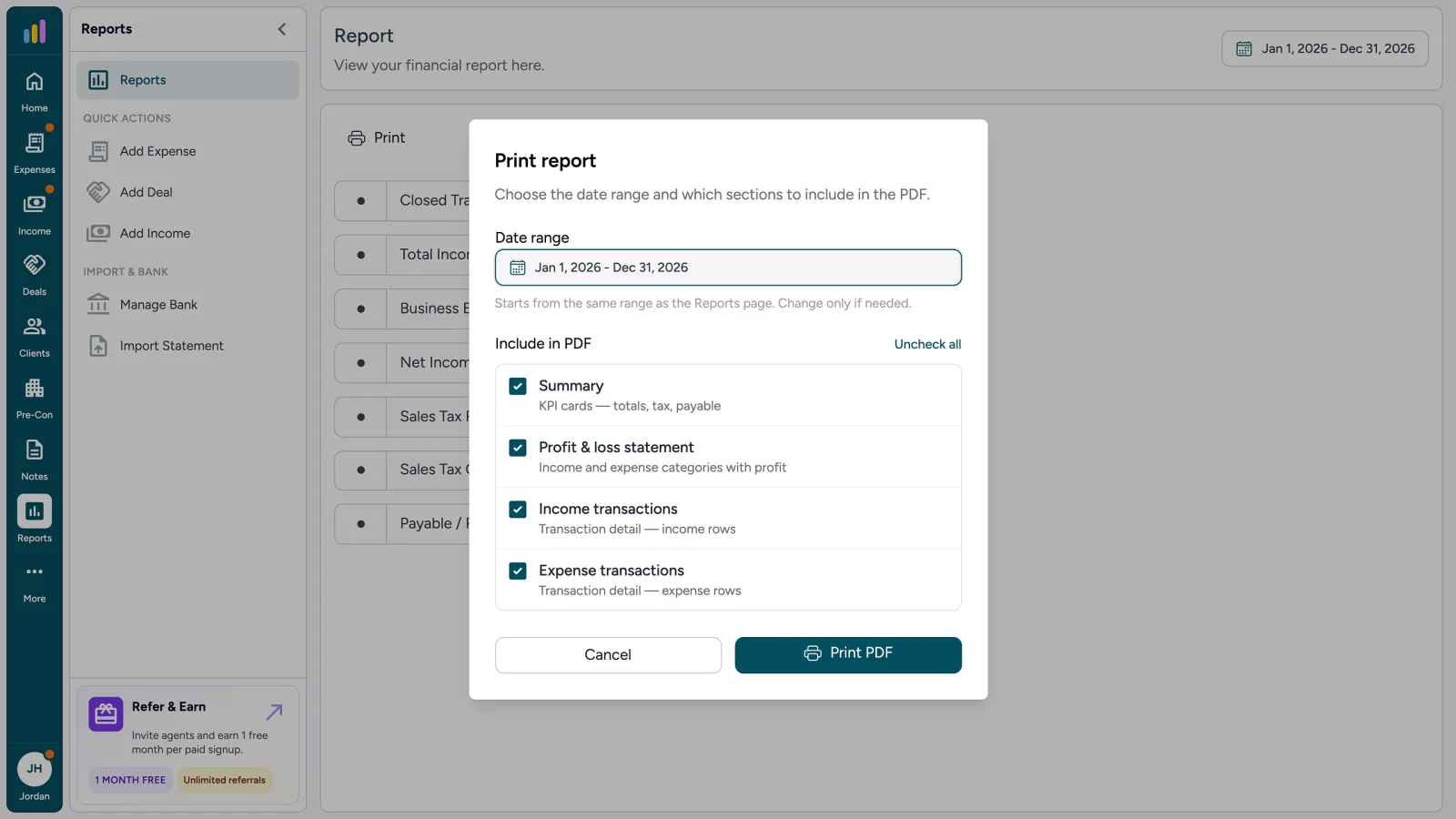
Click Print to open a dialog. The date range starts from the one on your Reports page, and you can change it if needed. Then choose what goes into the PDF: Summary, Profit & Loss statement, income transactions, and expense transactions.
- Summary: the same totals shown on the Reports screen
- Profit & Loss: income and expense categories, with profit
- Income and expense transaction detail, if you include those sections
Print report
Choose the date range and which sections to include in the PDF.
Date range
Include in PDF
- SummaryKPI cards - totals, tax, payable
- Profit & loss statementIncome and expense categories with profit
- Income transactionsTransaction detail - income rows
- Expense transactionsTransaction detail - expense rows
What the PDF Is, and Is Not
Your name, reporting period, currency, and sales tax rate come from your profile. The statement lists category totals for revenue and expenses and ends with your profit, and you can append income and expense registers if your accountant wants the detail. Hand it to your accountant or bring the figures into your business tax preparation software. It is a bookkeeping package, not a completed tax form, and it works alongside the tax software for small business returns that you or your accountant already use.
Which Report Do I Use?
The year-end P&L, module prints, and downloads each do a different job. Use Reports for the package you hand your accountant, and the module screens for everyday lists.
| Report | Use it for | Where |
|---|---|---|
| Year-End Profit & Loss | Period totals and a printable P&L for your accountant | Reports |
| Module Print | The expenses, income, deals, or pre-con view you have open | The Print button on that screen |
| Sales Tax Type | How tax is stored on each expense, income, or commission line | On the form, then totals on Reports |
| Sales Tax Totals | Tax received, tax on expenses, and payable / refund for a period | Reports |
| CSV Export & Receipt ZIP | Raw rows for a spreadsheet, and receipt PDFs for a date range | Export on Expenses, Income, Commissions, Deals, Pre-Construction, Clients, and Notes (receipt ZIP on Expenses and Income) |
Sales tax figures use the rate you set in your profile. AgentXpense does not decide what is taxable, file or remit GST, HST, PST, or state sales tax, or replace your government sales-tax account. Ask a qualified tax professional about your obligations.
Tax-Ready Reports FAQ
A tax-ready report for real estate agents is the Reports screen for a date range, showing closed transactions, income, expenses, net income, and sales tax, plus a printable P&L report for realtors. It gives your accountant organized books, not a filed return.
Many US real estate agents receive a Form 1099 from their brokerage, but it depends on your situation. AgentXpense does not create or file 1099 forms. It keeps your commission income and expenses in a Profit & Loss Statement that your accountant can use when preparing your return, such as Schedule C. Ask your accountant what applies to you.
That depends on your income and the tax rules that apply. AgentXpense does not calculate or pay quarterly estimated taxes. It keeps a running P&L so you and your accountant can see income and expenses during the year.
No. AgentXpense organizes your income, expenses, and sales tax into reports for your accountant. It does not file returns or give tax, legal, or accounting advice.
No. The PDF is a Profit & Loss Statement, not a filled tax form. Your accountant can use its totals when preparing forms like Schedule C in the US or T2125 in Canada.
Closed transactions, total income, business expenses, net income, sales tax received, sales tax on expenses, and payable or refund, for any date range you choose.
Yes. Pre-construction commissions are included in the Commissions ledger and flow into Reports alongside your deal commissions.
In your profile. Set it once, then choose a tax type on each expense, income entry, or commission.
None adds no tax. Inclusive means the amount you enter already includes tax at your profile rate. Exclusive means the amount is before tax and AgentXpense adds tax on top.
No. It records and totals the tax you track. Filing, remittance, and deductibility stay with you and your accountant.
No. AgentXpense is bookkeeping software that organizes your income, expenses, and sales tax and prints a Profit & Loss PDF, so it supports your tax preparation software rather than replacing it. It does not prepare or file your return.
Yes. Expenses, Income, and Deals can print Summary, List, or Monthly views, Commissions print from Income, and Pre-Construction offers Summary and List. CSV export is available on Expenses, Income, Commissions, Deals, Pre-Construction, Clients, and Notes. Receipt PDFs download as a ZIP for a date range.
Yes. Reports and printing are included in the 30-day free trial, and no credit card is required. After that, it is $14/month, or $9.99/month billed yearly.
2255 Dundas Street West, Suite 207 Mississauga, ON L5K 1R6
© Agent Xpense Inc. All rights reserved.