
Expense Tracking Software for Real Estate Agents
Track real estate expenses with 13 editable categories, AI category suggestions, receipt scanning, and optional deal links, so your books stay ready all year.
No credit card required · 30-day free trial
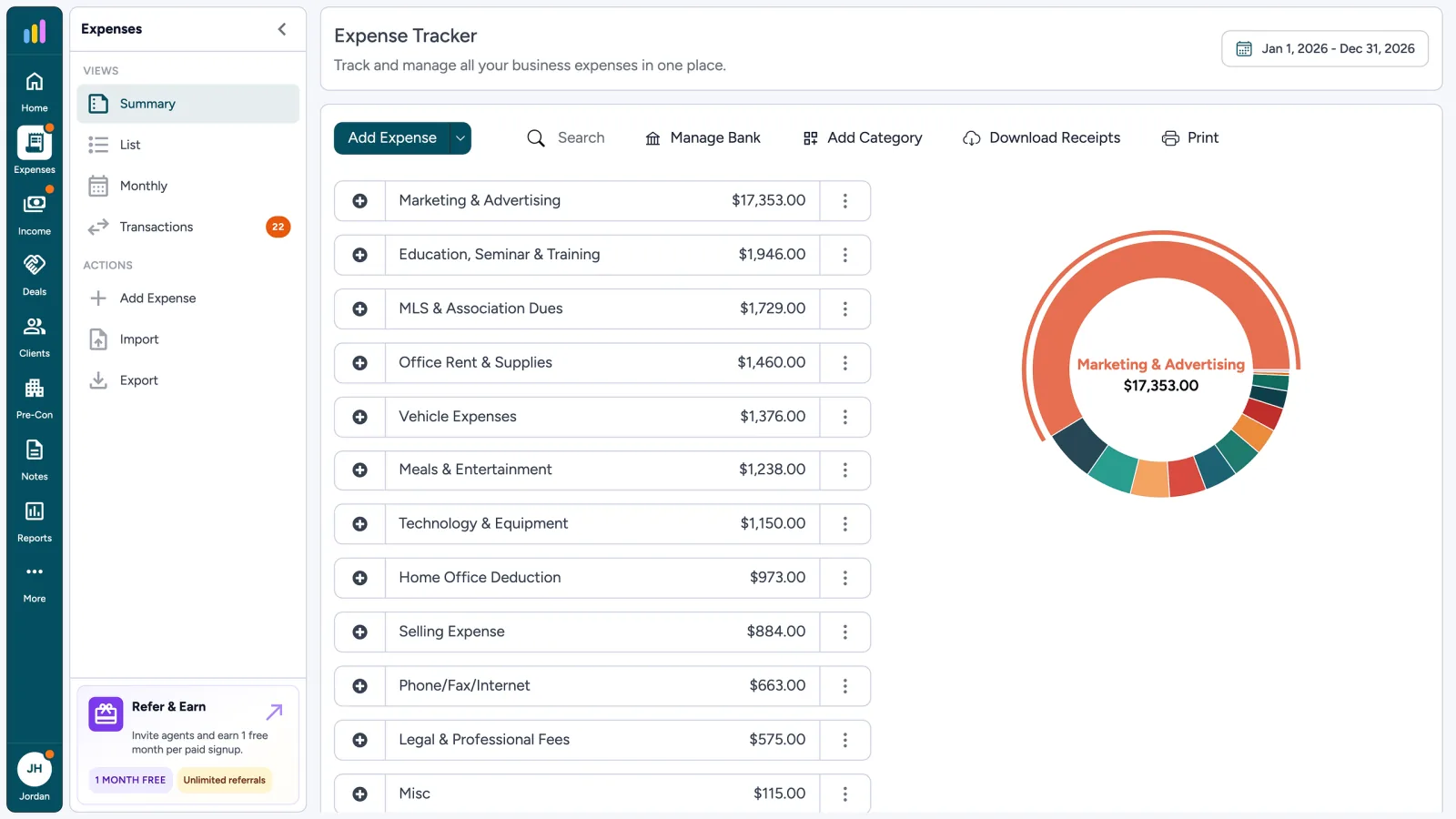
What Your Expense Ledger Tracks
- 1
13 Editable Categories
- 2
AI Suggests, or You Pick
- 3
Optional Deal Link
- 4
CSV & ZIP Export
What Is Expense Tracking for Real Estate Agents?
Expense tracking for real estate agents means keeping business spending on the books: amount, date, category, tax, and an optional receipt or deal. AgentXpense is that real estate agent expense tracker. Add a line by hand, scan a receipt, import a statement, or connect your bank. Nothing is permanent until you save.
Expense Tracker
Track and manage all your business expenses in one place.
- Marketing & Advertising$ 17,353.00
- MLS & Association Dues$ 1,729.00
- Vehicle Expenses$ 1,376.00
- Meals & Entertainment$ 1,238.00
- Office Rent & Supplies$ 1,460.00
- Home Office Deduction$ 973.00
- Total Expenses$ 24,129.00
Expense Tracker
Track and manage all your business expenses in one place.
Add Category
Category *
Categories Built for Real Estate, Not Retail
Every account starts with 13 expense categories built for agents. Edit, add, or delete them as you need. They are labels for your books, not a list of what you may deduct. Ask your accountant what is deductible.
AI Suggests the Category, You Decide
Scans, statement imports, and bank sync get an AI category from your realtor chart. It is not locked. You can accept it, change it, or choose the category yourself - including when you type a line by hand.
AI auto-category
Receipt scans, statement imports, and bank sync suggest a category from the vendor. Change it if it is wrong, and the next similar vendor gets smarter.
Pick it yourself
Every expense form shows your full category list. Override any AI suggestion now, or recategorize later. Your choice always wins.
Add Expense
AI suggested a category from this vendor.
AI Receipt Scanner - Review the pre-filled fields before saving.
Four Ways to Add an Expense
Type it, scan a receipt, import a statement, or connect your bank. AI suggests a category when it can, and you can change it before the line is permanent.
Add Expense
Enter the vendor, amount, date, category, and tax.
Capture Tools Have Their Own Pages
Receipt scanning, statement import, and bank connections each have a dedicated page. This page covers the ledger where every saved expense lives.
Expense Tracker
List view · export CSV or a ZIP of receipt PDFs.
| Date | Vendor | Category | Amount |
|---|---|---|---|
| 12 May 2025 | Professional Photography AZ 8514 E Vista Bonita Dr | Marketing & Advertising | $ 450.00 |
| 03 Apr 2025 | Arizona Association of Realtors | MLS & Association Dues | $ 1,729.00 |
| 08 May 2025 | Circle K | Vehicle Expenses | $ 86.40 |
| 12 Mar 2025 | Open House Catering 20402 N 92nd Pl | Meals & Entertainment | $ 186.40 |
Possible duplicate
Professional Photography AZ · $450.00 · 12 May 2025 already exists. Review both before saving twice.
Once It Is Saved, the Ledger Does the Rest
Review your spending in Summary, List, or Monthly view. Export to CSV, or download receipts as PDFs in one ZIP for any date range.
- Link staging, photography, or closing-gift costs to the deal they belong to.
- If the vendor, amount, and date match an existing line, you see both before saving twice.
- There is no GPS mileage log. Vehicle costs go under Vehicle Expenses like any other spend.
- Deal Link (Optional)
- Duplicate Check
- CSV Export
- ZIP of PDFs
Tax on Each Line, Rate From Your Profile
Set your sales tax rate once in your profile, then choose how each expense is taxed:
- None: no sales tax on this expense
- Inclusive: the amount you enter already includes tax
- Exclusive: the amount you enter is before tax is added
Add Expense
Rate from your profile · type on each line.
Real Estate Expense Tracking FAQ
Yes. Export your expense list to CSV, filtered by date range or category. You can also download attached receipts as PDFs in one ZIP file for any date range.
Every account starts with 13 categories: Marketing & Advertising, MLS & Association Dues, Vehicle Expenses, Office Rent & Supplies, Phone/Fax/Internet, Meals & Entertainment, Home Office Deduction, Selling Expense, Education, Seminar & Training, Technology & Equipment, Interest & Bank Charges, Legal & Professional Fees, and Misc. You can edit or add your own, and delete any category that has no transactions.
It suggests a category based on the vendor and the categories you have used before. You can change it before saving, and the suggestions improve as you use the app.
No. There is no GPS mileage log. Vehicle costs go under the Vehicle Expenses category like any other expense.
Upload a photo or PDF when adding an expense. AI reads it, pre-fills the vendor, date, amount, tax, and category, and you review and save. The receipt stays attached to the record.
Yes. Upload a CSV, Excel, or PDF statement, including on the free trial. AI helps map the columns, and imported lines wait in Transaction Review until you categorize and accept them.
Yes, on paid plans. AgentXpense connects through Plaid with read-only access and syncs weekly. New transactions go to Transaction Review, not straight into your ledger.
Yes. Any expense can be linked to a deal, so you can see what staging, photography, or closing gifts cost for that transaction. Linking is optional.
AgentXpense does not GPS-track drives or decide deductibility. Log gas, insurance, repairs, or other vehicle vendor spend under Vehicle Expenses, and keep any mileage log your accountant asks for separately. Ask a qualified tax professional what you may deduct.
That depends on your situation and the tax rules that apply. AgentXpense records the fees and expenses you enter so your accountant can review realtor tax deductions. It does not decide what is deductible and is not a deduction finder.
AgentXpense can record staging, photography, and meals or entertainment, and you can link those costs to a deal. Whether they are deductible is a tax question for your accountant, not a product rule.
You can connect supported bank accounts or import statements, then review each line before it hits the ledger. AgentXpense does not require you to keep only a business account, and it does not move money between accounts.
Yes. You get 30 days free with no credit card required, including expense tracking, receipt scanning, and statement import. After that, it is $14/month, or $9.99/month billed yearly. Bank connections require a paid plan.
Keep the year in the books, not in a shoebox.
No credit card required · 30-day free trial
Start Free Trial2255 Dundas Street West, Suite 207 Mississauga, ON L5K 1R6
© Agent Xpense Inc. All rights reserved.