
Income Tracking Software for Real Estate Agents
Record commission-based income, referral fees, and other income in one ledger. Choose the tax type on each entry, then review totals by category and month.
No credit card required · 30-day free trial
What Your Income Ledger Tracks
- 1
Commission & Referral Income
- 2
Sales Tax Type on Each Entry
- 3
Optional Deal Link
- 4
CSV Export & Print
What Is Income Tracking for Real Estate Agents?
Income tracking for real estate agents means recording all the money coming into your business: commission-based income, referral fees, and other income, with the date, amount, tax, and the deal it came from. AgentXpense is that ledger. Every account starts with two income categories, Referrals and Other. Commission income comes from your deals and appears in its own Commissions view, so you never enter the same check twice.
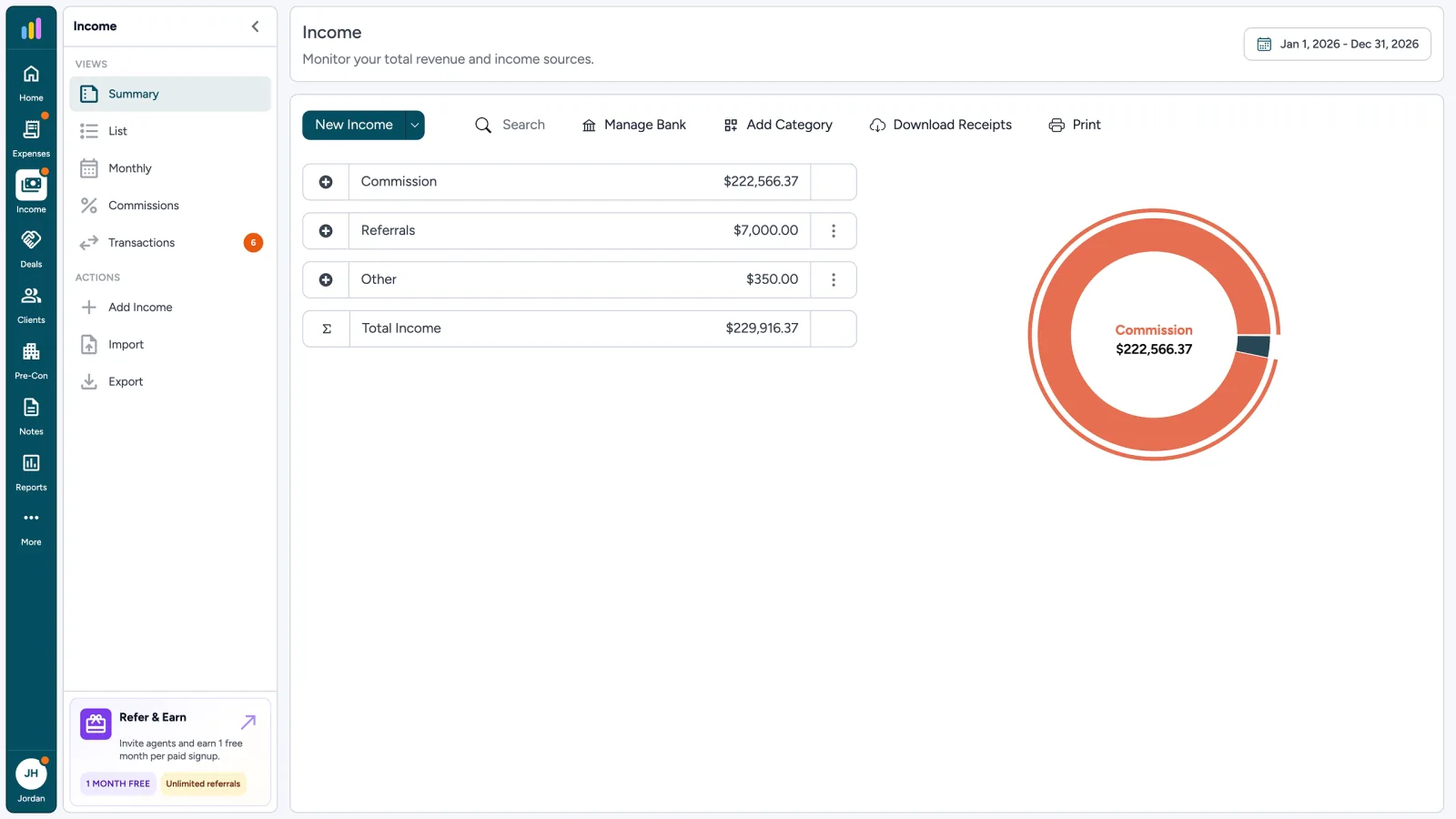
Income
Monitor your total revenue and income sources.
- Commission$ 222,566.37
- Referrals$ 7,000.00
- Other$ 350.00
- $ 229,916.37Total Income
Three Ways to Add Income
Commissions come from your deals. Other income is added by hand or by import.
- 1
Commission income
Enter net pay, date, and tax on a Pending or Closed deal. AgentXpense creates the Income → Commissions row for you.
- 2
Referral and other income
Add referral fees and other income by hand with a category, date, amount, and tax type. Link it to a deal when it belongs to one.
- 3
Imported income
Upload a CSV, Excel, or PDF statement. Income lines wait in Transaction Review until you categorize and accept them.
Add Income With the Details You Need
Pick a category, set the date and amount, and choose how sales tax applies. The subtotal, sales tax, and net income update as you type, so you can check the numbers before you save. Add a note or receipt if needed.
- Category, date, and source
- Amount with None, Inclusive, or Exclusive tax
- Optional link to a deal
- Optional note and receipt upload
Income Details
Referral fee linked to a deal.
Income saved
8514 E Vista Bonita Dr
Add Income
Rate from your profile · type on each line.
Income saved
Inclusive · $7,000.00
Choose How Sales Tax Applies
Your sales tax rate comes from your profile. On each income entry, pick a tax type and AgentXpense calculates the subtotal, sales tax, and net income for you, so there is no manual math and no second spreadsheet.
- None: no sales tax on this income
- Inclusive: the amount you enter already includes tax
- Exclusive: the amount you enter is before tax, and tax is added on top
AgentXpense records sales tax. It does not file or remit it.
- Sales Tax Tracking
Keep Your Income Records Clean
Catch repeats, store the paperwork, and keep income tied to the deal that earned it.
- Duplicate check: if the source, amount, and date match an existing entry, you see both side by side before saving
- Receipts: upload a JPG, PNG, HEIC, or PDF up to 20 MB with an income entry
- Deal link: link income to the deal it came from
- Duplicate Check
- Receipt Upload
- Deal Link
- ZIP of Receipts
Income
Duplicate check before a second copy is saved.
| Date | Source | Amount |
|---|---|---|
| 03 Oct 2026 | Scottsdale Referral Network | $ 7,000.00 |
| 16 Apr 2025 | Cooperating Broker - Chen | $ 2,500.00 |
Possible duplicate
Scottsdale Referral Network · $7,000.00 · 03 Oct 2026 already exists. Review both before saving twice.
Review Income Your Way
Switch views to see totals by category, every entry, or income month by month.
- 1
Summary
Totals by category with a pie chart for any date range.
- 2
List
Every entry in a table you can search, sort, and filter.
- 3
Monthly
Your income broken down month by month.
- 4
Commissions
Commission income from closed deals and pre-construction payments.
From Income to Tax-Ready Reports
Your income feeds the dashboard and Reports. Pick a date range to see income, expenses, net income, and sales tax received, then print or export it for your accountant.
AgentXpense organizes your income records. It does not file taxes or give tax, legal, or accounting advice.
Income Tracking FAQ
Yes. Enter net pay, date, and tax on a Pending or Closed deal, and AgentXpense creates the Income → Commissions row. You do not enter the same check again under Income.
Every account starts with two categories, Referrals and Other. Commission income comes from your deals and appears in the Commissions view.
None adds no sales tax. Inclusive means the amount you enter already includes tax at your profile rate. Exclusive means the amount is before tax, and AgentXpense adds tax at your profile rate.
Yes. Linking is optional. Link a referral fee or other income to the deal it came from, so the records for that transaction stay together.
Yes. Upload a CSV, Excel, or PDF statement, including on the free trial. Income lines wait in Transaction Review until you categorize and accept them. Bank connections are available on paid plans.
Yes. Upload a JPG, PNG, HEIC, or PDF file up to 20 MB with the entry. You can also download receipts in one ZIP file for any date range.
Yes. Export income to CSV, and print the Summary, List, Monthly, or Commissions view for the date range you select.
No. AgentXpense does not have an invoicing module. It records your income and commissions, but it does not send invoices.
Yes. Income tracking is included in the 30-day free trial, and no credit card is required. After that, it is $14/month, or $9.99/month billed yearly.
2255 Dundas Street West, Suite 207 Mississauga, ON L5K 1R6
© Agent Xpense Inc. All rights reserved.