
Commission Tracking Software for Real Estate Agents
Record commission-based income on the deal that earned it. Enter net pay, date, and tax once, and AgentXpense creates the Income → Commissions row for you.
No credit card required · 30-day free trial
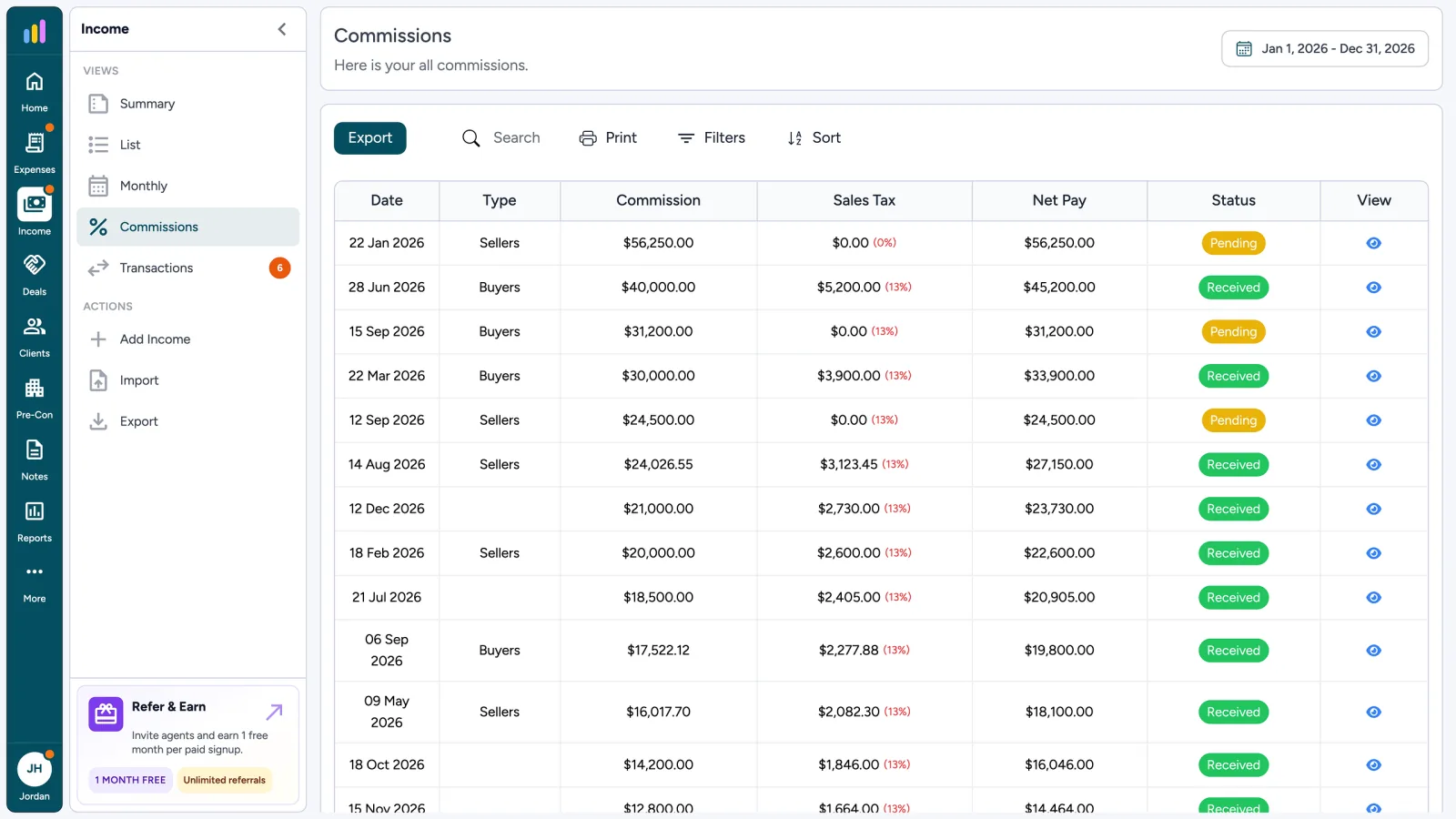
What Your Commissions Ledger Tracks
- 1
Net Pay After Brokerage
- 2
Received Date & Tax Type
- 3
Pending vs Received Status
- 4
No Duplicate Income Entry
What Is Commission Tracking for Real Estate Agents?
Commission tracking for real estate agents means recording commission-based income on the deal that earned it. In AgentXpense, you add net pay, received date, and tax to a Pending or Closed deal, and the Income → Commissions row is created for you.
8514 E Vista Bonita Dr
Sellers · List date 22 Dec 2025
Deal Price
$ 1,120,000.00
Total Earned
$ 0.00
Pending commission: $ 28,000.00
Total Expenses
$ 1,970.00
Net Profit
$ -1,970.00
Professional Photography AZ
05 Dec 2025
Staging Rental, Nest Well
08 Dec 2025
Facebook Listing Ads
12 Dec 2025
After brokrage deduction & fees.
(0 %) Tax rate applied
Enter Your Commission Once on the Deal
Enter your net pay, received date, and tax type, and AgentXpense calculates the agent commission for you.
- Net pay: what you keep after brokerage fees
- Received date
- Tax type: None, Inclusive, or Exclusive
- Commission is calculated, never retyped
View Every Commission Under Income → Commissions
Saving a deal creates a commission row linked back to it. Filter by type, net pay, amount, and status, then export to CSV or print when your accountant asks.
- Status shows Pending or Received
- Type shows Deal or Pre-Con, so resale closings and staged payments stay separate
- Your dashboard pipeline shows Active, Pending, and Closed deal counts and amounts
- Income → Commissions
- Pending or Received
- Deal or Pre-Con
- CSV & Print
From Commission Check to Tax-Ready Report
Reports
PrintJan 1 - Dec 31, 2026
Total income
$186,420.00
Business expenses
$41,286.44
Net income
$145,133.56
Payable / refund
$16,704.46
- Commission income38$168,900.00
- Referral fees6$12,450.00
- Other income3$5,070.00
Tax-Ready Reports
Every commission feeds your Reports page. Pick any date range to see total income, sales tax received, and net payable or refund.
8514 E Vista Bonita Dr
ClosedCommission received
$28,000.00
Linked expenses
$2,065.00
- Professional Photography AZ$450.00
- Staging Rental, Nest Well$1,200.00
- Facebook Listing Ads$320.00
- Lockbox & Yard Sign$95.00
Deal Profitability
Link staging, photography, or closing-gift expenses to a deal to see what it cost to close, not just what it paid.
Commission in Draws? Use Pre-Construction Tracking
Builder and assignment commissions often arrive in stages. Record up to four dated payments on a pre-con project, each with its own net pay, date, tax, and status.
After brokrage deduction & fees.
Real Estate Commission Tracking FAQ
Yes. You set your own sales tax rate in your profile, and it is applied automatically. You can choose None, Inclusive, or Exclusive tax on each commission.
Yes. Once you save net pay, date, and tax on a Pending or Closed deal, the commission income row is created for you. A deal closed without those fields does not create an income row.
Enter the net pay you received after your brokerage's deduction. AgentXpense records that commission-based income, but it does not store a split percentage.
Pending means the commission is expected but has not arrived yet. Received means the payment has landed. The status shows on every commission row.
Yes. Pre-construction projects support up to four dated payments, each with its own net pay, date, tax, and status.
Yes. You can export the commissions ledger to CSV or print it from Income → Commissions.
The dashboard shows your pipeline of Active, Pending, and Closed deals with counts and amounts. Individual commission rows live under Income → Commissions.
Yes. You get 30 days free with no credit card required. After that, plans are $14/month, or $9.99/month billed yearly.
Track Every Commission. Keep Income Organized.
30-day free trial, no credit card. Then $14/month or $9.99/month billed yearly. All features included.
Start Free Trial2255 Dundas Street West, Suite 207 Mississauga, ON L5K 1R6
© Agent Xpense Inc. All rights reserved.