
Income vs Expenses Chart
IncomeExpenses
$50k$40k$30k$20k$10k$0
JanFebMarAprMayJunJulAugSepOctNovDec
See income and expenses across the period, so a heavy spending month stands out without opening a spreadsheet.
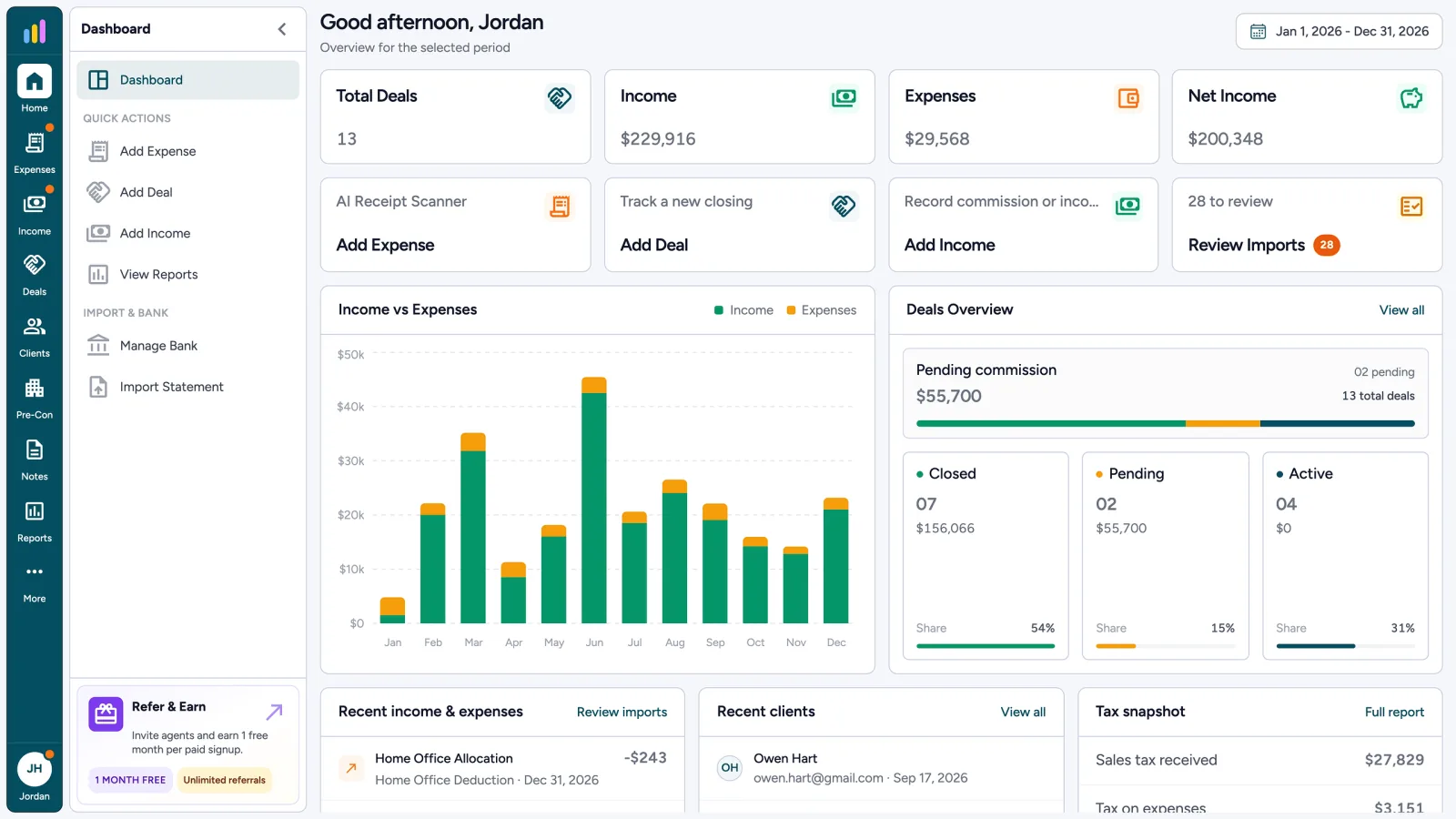
Accounting software for realtors, at a glance. The AgentXpense dashboard shows income, expenses, net income, and deal count for any date range, along with a sales tax snapshot, recent activity, recent clients, and quick actions in one place.
Review income, expenses, transactions, clients, and reports from one dashboard.
1. Financial Totals by Date Range
2. Income vs Expense Chart
3. Deal Pipeline Snapshot
4. Import Review Count
The AgentXpense dashboard is the central overview of your real estate business finances. It shows key totals for the date range you choose, including sales tax received and tax on expenses, along with your deal pipeline, recent transactions, recent clients, and quick actions. Each tile links to the deals, income, expenses, or reports behind the number.
Total deals, income, expenses, and net income sit at the top for the date range you choose. Under them, quick actions let you add an expense, add income, add a deal, connect your bank (on plans that include it), and review imports with a live count.
See income and expenses across the period, so a heavy spending month stands out without opening a spreadsheet.
Pending commission
$55,700
02 pending
13 total deals
See Active, Pending, and Closed deal counts, using the same statuses as Deal Management.
Review your latest income and expenses, and spot a wrongly categorized transaction while it is still fresh.
Quickly open the clients you recently added to deals, with a direct link to each client overview.
When a bank sync or statement import has transactions waiting, the dashboard shows how many need review. Clear the queue so your totals reflect your latest activity, then open the transactions behind them.
Import review
Bank sync and statements waiting to be accepted
Chevron #1842
03 Dec · Uncategorized
Staples Business
04 Dec · Uncategorized
Adobe Creative Cloud
06 Dec · Uncategorized
WeWork Day Pass
07 Dec · Uncategorized
Commission deposit
09 Dec · Uncategorized
Alongside your main totals, the dashboard shows sales tax received and sales tax on expenses for the selected period. These figures use the rate saved in your profile and the tax type picked on each line. Think of it as a quick read, not a filing. When you need the payable or refund amount, a category Profit & Loss, or a PDF for your accountant, open Tax-Ready Reports.
Use the dashboard as your starting point, then open reports, deals, and expenses when you need more detail. The net income here matches your reports, and each tile links to the records behind it. When you need paper or files, each module has its own Print button (Summary, List, or Monthly) and CSV export, while the year-end Profit & Loss PDF comes from Reports.
For the date range you select, the dashboard shows total deals, income, expenses, and net income. It also includes an income vs expenses chart, Active, Pending, and Closed deal counts, recent transactions, recent clients, and quick actions, including how many imported transactions still need review.
Yes. The dashboard uses the same date range control as the rest of AgentXpense. The totals and the chart update to match the period you select.
Transactions from bank sync and statement imports wait in a review queue until you accept them. The dashboard shows how many are waiting, so they don't sit uncategorized until tax season.
No. Total deals is the number of deals in the selected date range. The pipeline card breaks that number into Active, Pending, and Closed, so you can tell closed deals apart from files that are still in progress.
No. The dashboard has a fixed layout: financial totals and quick actions at the top, then the income vs expenses chart and deal pipeline, then recent activity. It is designed as a short, clear snapshot of your business rather than a customizable widget board.
Yes. The dashboard tiles link to your deals, income, expenses, and reports, and the tax snapshot links to the full report.
Yes. The dashboard shows total income, total expenses, and net income for the selected date range, along with your most recent income and expense transactions.
Yes. It shows sales tax received and tax on expenses for the selected date range, based on the rate in your profile. For payable or refund totals, open Reports. AgentXpense does not file or remit sales tax.
The dashboard is a summary view. Printing and CSV export live on each module, such as Expenses, Income, Deals, and Pre-Construction, and the year-end Profit & Loss PDF prints from Reports.
Yes. You get a 30-day free trial with no credit card required, including the dashboard, deals, and reporting.
Review income, expenses, transactions, clients, and reports from one dashboard.
Start Free Trial2255 Dundas Street West, Suite 207 Mississauga, ON L5K 1R6
© Agent Xpense Inc. All rights reserved.