
Real Estate Technology
Bank Connections for Realtors: How Automatic Transaction Sync Works
How bank connections actually work for realtors — read-only access, weekly sync, security risks, and how it compares to manual statement import.

A gas receipt from a showing. A client lunch. MLS dues. Facebook ads for a new listing. A negotiation course.
For a busy real estate agent, receipts pile up fast. Some get crumpled in your wallet, others are buried in your inbox, and a few end up as forgotten screenshots. By tax time, the bigger problem isn't just finding a receipt. It's remembering what the expense was for, which deal it belonged to, and whether you already recorded it.
This guide shows how to organize real estate receipts with a simple 5-step system, how to avoid common receipt-management problems, and how tools like Agent Xpense can reduce manual bookkeeping.
Real estate agents juggle dozens of different business expenses throughout the year. Good real estate receipt organization saves hours at tax time.
Fuel for showings, advertising, MLS and association dues, client meals, office supplies, software subscriptions, education, insurance, professional services, photography, staging, and other selling expenses can all become part of your business records.
Organized receipts help you see where your business money is going, find individual receipts when you need them, review expenses throughout the year, and give your accountant complete records when it counts. They also reduce the chance of missing or duplicating transactions and keep your expense categories consistent.
One distinction worth making clearly: organizing an expense does not automatically make it tax-deductible. Expense categories and accounting records help you organize your business activity, but whether a particular expense qualifies for a deduction depends on applicable rules and your individual circumstances. If you're unsure about the tax treatment of an expense, consult a qualified tax professional.
Before building a receipt system, it helps to understand what you're actually trying to keep track of. These are the real estate business expenses most agents deal with.
Showings, open houses, inspections, client meetings, and property tours put a lot of miles on your vehicle. Depending on your circumstances, you may have gas receipts, parking charges, tolls, and other vehicle-related expenses to document. Because these expenses happen so frequently, capturing them immediately is far easier than trying to reconstruct them weeks later.
MLS subscriptions and association dues may arrive as annual, quarterly, or semi-annual charges. Because they don't occur every day, they're easy to overlook when reviewing records later. Keep the supporting receipt or invoice with the corresponding transaction.
Real estate marketing can include Facebook and Instagram advertising, online listing fees, print flyers, yard signs, direct mail, listing photography, digital marketing services, and other promotional expenses. Many of these are paid online, so the documentation may be an email receipt, invoice, billing statement, or downloadable PDF rather than a paper receipt.
Lunches, coffees, dinners, and meetings with clients or referral partners create many small transactions throughout the year. The receipt tells you where you spent the money and how much, but it may not explain the business purpose months later. A short note about who you met with and why goes a long way.
Professional photography, drone footage, virtual tours, staging, and other listing-related services are often directly connected to a specific property.
A real estate business relies on many recurring services: CRM software, transaction management tools, e-signature platforms, design software, cloud storage, and communication services. Because these are billed automatically, their receipts can easily get buried in email.
Courses, conferences, seminars, coaching, and license renewal fees can accumulate throughout the year. Keeping these records organized means you don't have to search through months of email and bank statements later.
Real estate professionals may also pay accountants, lawyers, consultants, insurance providers, and other service providers. Keep the supporting documentation with each transaction and organize these expenses consistently.
Most agents know they should keep better records. The difficult part is maintaining a system while you're busy showing properties, meeting clients, negotiating deals, and managing listings.
Here are the most common roadblocks agents face.
Paper receipts disappear. They get crumpled in pockets, left in cars, or accidentally thrown away.
Digital receipts scatter. One receipt is in your inbox. Another is a PDF in your downloads folder. Another is a screenshot on your phone.
Expenses get recorded late. You planned to log a client dinner the same day. Three weeks later, you're looking at a bank statement and trying to remember what the transaction was for.
Categories become inconsistent. Similar expenses get assigned to different categories, making your reports harder to understand.
Duplicates creep in. You manually record an expense and later import the same transaction from your bank or statement.
Receipts aren't connected to the transactions they support. You may have all the files somewhere, but figuring out which receipt belongs to which expense becomes its own bookkeeping task.
A good receipt system addresses all of these at the point where they happen.
For each receipt or expense, try to preserve the information that helps you understand the transaction later.
Vendor name (who you paid)
Date (when the transaction occurred)
Amount (how much you paid)
Tax information (when applicable and available)
Business purpose (what the expense was for)
Category (where the expense belongs in your system)
Related deal (when the expense is connected to a specific listing or transaction)
Receipt image or file (the supporting document)
Documentation and retention requirements vary by jurisdiction, document type, and circumstances. US agents should review current IRS recordkeeping guidance. Canadian agents should review applicable CRA requirements. When you're unsure, a qualified tax professional can provide guidance based on your situation.
Receipts are the foundation of real estate bookkeeping. Every receipt supports an entry in your records, and clean records make it easier to see your income, expenses, and deal-level costs at any time. Good bookkeeping doesn't require an accounting degree, just a consistent habit of capturing, categorizing, and reviewing. In practice, that means every expense has a vendor, date, amount, category, and receipt attached, and every deal-related cost is linked to the right listing. Do this consistently, and your accountant gets a clean set of records instead of a year of loose ends.
The easiest receipt system is one you can actually maintain.
Capture, Extract, Categorize, Review, Store. Each step solves a different part of the problem.
Get the receipt into a centralized system before it disappears.
For paper receipts, photograph them as soon as possible. At the restaurant, the gas station, or the office supply store. You don't have to wait until you're back at your desk. Paper receipts can fade, tear, or simply disappear.
For digital receipts, create a consistent place to keep them. That could be a dedicated email folder, cloud storage, or expense-management software. The important thing is that receipts don't stay scattered across your phone, inbox, and physical wallet.
If you're using Agent Xpense Receipt Scanner, you can upload receipt files directly while recording an expense, right from your phone's browser, with no app to install. Supported formats include JPG, JPEG, PNG, HEIC, and PDF, with files up to 20 MB.
Capture now. Sort and review while the transaction is still easy to remember.
Capturing a receipt is only the first step. You also need to turn the information on that receipt into a usable expense record.
Manually extracting data for every transaction is tedious, which is why many agents skip it entirely or batch it weeks later. Both approaches lead to headaches down the road.
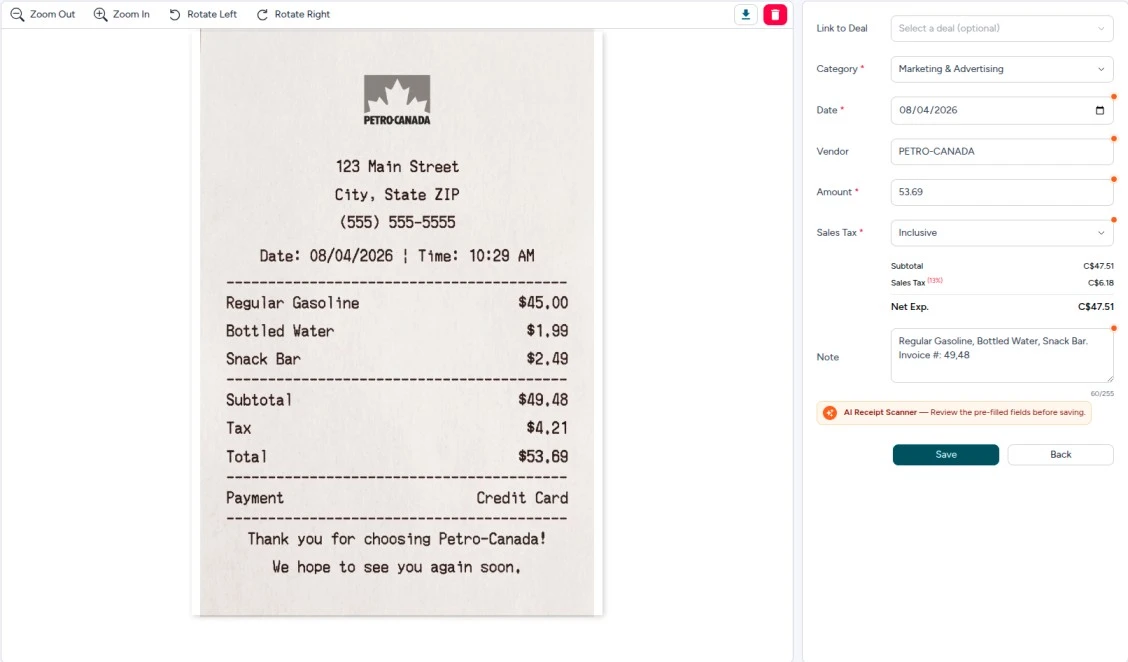
OCR (optical character recognition) reads text from a receipt image or PDF. AI can then interpret that information and pre-fill structured fields such as vendor, date, amount, applicable tax information, and a description.
With Agent Xpense, the workflow is designed to reduce repetitive data entry. Upload the receipt, and the AI reads the document. The information gets pre-filled, you review the details, and then save the transaction. You can also mark whether the amount includes tax, excludes tax, or has no tax applied, and Agent Xpense calculates the subtotal, tax, and total for you. Any field filled by AI gets a visual indicator so you know exactly what to check before saving.
The goal isn't to eliminate your judgment. It's to reduce typing and give you a useful starting point.
Consistent real estate expense tracking starts with consistent categories. Consistent categorization turns a messy list of transactions into a clear financial picture. If similar expenses land in different categories every time, your reports stop making sense.
Agent Xpense includes 13 pre-built expense categories built around common real estate business expenses:
Marketing & Advertising
MLS & Association Dues
Vehicle Expenses
Office Rent & Supplies
Phone/Fax/Internet
Meals & Entertainment
Home Office Deduction
Selling Expense
Education, Seminar & Training
Technology & Equipment
Interest & Bank Charges
Legal & Professional Fees
Misc.
You can also use custom categories when your business needs something more specific.
These categories are for organizing records. They do not determine the tax treatment of an expense.
Automation still needs a human check. AI can speed up data entry, but OCR systems can occasionally misread a number, misunderstand a vendor, or interpret an unusual receipt incorrectly.
Before saving an expense, check:
Is the vendor correct?
Is the date correct?
Does the amount match the receipt?
Is the category appropriate?
Is the tax information correct, when applicable?
Is the business purpose clear?
If the expense belongs to a deal, is it linked correctly?
The Transaction Review Queue
This step becomes especially important when importing transactions from a bank or statement.
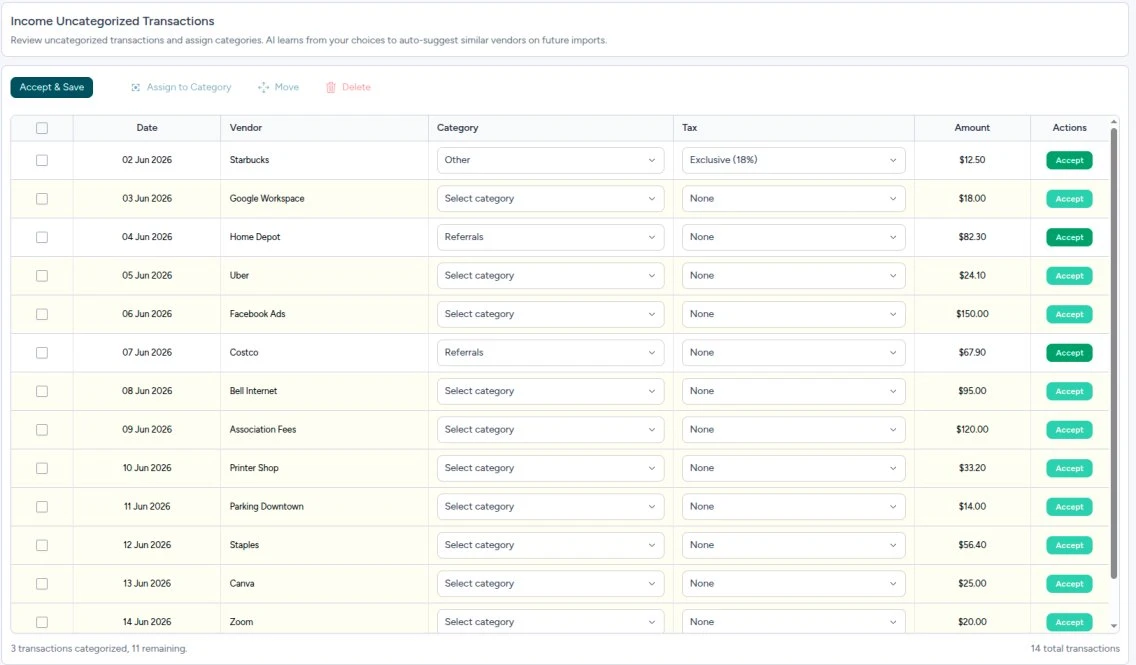
In Agent Xpense, imported and bank-synced transactions can go through a Transaction Review workflow before they're accepted into your records. This gives you a chance to confirm the transaction belongs in your records, review or change the category, correct transaction details, identify potential duplicates, and remove personal or incorrect transactions.
Automation prepares the transaction. You review and approve it. That's the right balance.
Once an expense is recorded and reviewed, keep the supporting receipt attached to it directly. Not in a separate folder you have to mentally connect to the right transaction months later.
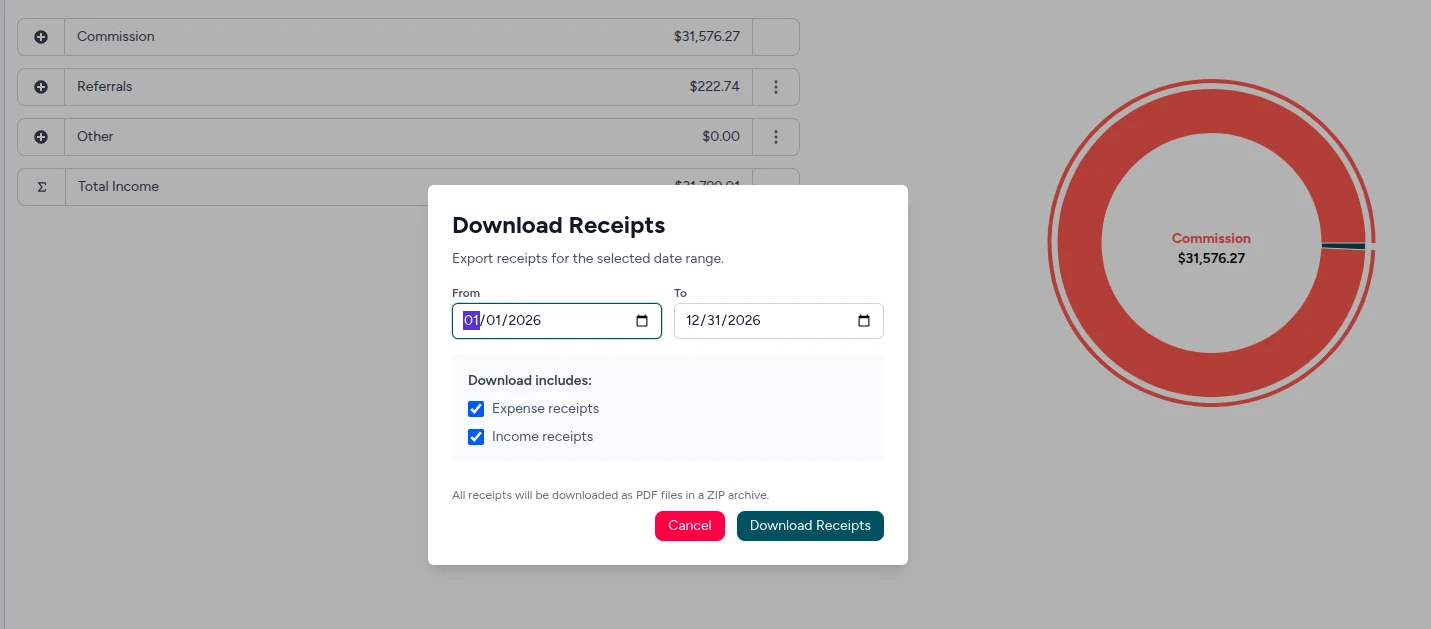
Agent Xpense stores uploaded receipt files with the relevant expense or income record. From any record, you can view, zoom, rotate, download, or replace the file.
You can also download receipts for a selected date range as a ZIP file. That makes it straightforward to gather supporting documentation when preparing records for an accountant or tax professional.
Both paper and digital receipts can be part of a real estate business's records. The difference is how easy they are to manage over time.
Factor | Digital | Paper |
Searchability | Easier to search and filter | Requires manual sorting |
Storage space | No physical filing space | Physical storage required |
Durability | Digital files don't fade like paper | Can fade, tear, or become unreadable |
Access | Available from connected devices | Requires physical access |
Backup | Can be backed up electronically | Requires your own backup system |
Digital recordkeeping really pays off for Realtors who spend most of their working day out in the field. Still, whether electronic copies satisfy a particular tax or legal requirement depends on the applicable rules and your circumstances. Check the relevant tax authority or speak with a qualified tax professional if you're unsure.
For many agents, the biggest bookkeeping bottleneck isn't capturing receipts. It's entering all the information afterward.
AI receipt scanning is designed to reduce that repetitive work. An AI receipt scanner for Realtors reads the document and pre-fills the key fields for you.
When you upload a receipt to Agent Xpense, the system can also suggest categories based on transaction history and vendor information. For recurring vendors, previous transaction history can help provide more relevant suggestions over time.
This same vendor-based categorization approach works across different transaction workflows, including bank-synced and imported transactions.
Duplicates often appear when manual entry and automated imports overlap.
Here's a common situation: you photograph a receipt and record the expense on Monday. A week later, you import your bank transactions. The same purchase appears again. Accept both without verifying, and you've accidentally recorded the same expense twice.
Agent Xpense's duplicate detection compares vendor, amount, and date across your existing records. When a potential duplicate is found, the system shows the transactions side by side so you can review them and decide how to handle the match.
This is particularly useful after bulk imports or when importing several months of historical bank transactions.
The habit to build is simple: review imported transactions before accepting them into your records.
A receipt tells you what you paid. Connecting the expense to a specific deal tells you where that money was spent.
Consider expenses like listing photography, staging, drone footage, property marketing, closing gifts, and other selling expenses. When an expense is connected to the relevant deal, you can view that cost in the context of the transaction rather than treating every expense as part of one large annual total.
In Agent Xpense, expenses and income can be linked to deals when recording or editing transactions. This adds deal-level context to your financial records.
Tracking Brokerage Deductions
Closed real estate deals can also involve brokerage deductions from earned commission.
Agent Xpense includes commission-related fields that let you record the agent commission, brokerage deduction, net pay, and received date. Keeping these details together makes it easier to understand how the commission amount relates to what you actually received.
Pre-construction projects, where commissions may arrive in multiple installments rather than one payment, can be tracked through the Pre-Con module. Each payment tranche is recorded with its own received date, net pay, commission amount, and tax type, while the payment history remains part of the same project.
It happens to the best of us. A paper receipt gets tossed, an email gets buried, or a PDF vanishes. Don't just ignore the transaction.
Check your bank or credit card statement. The transaction may show the vendor, date, and amount. A bank statement isn't a replacement for every type of supporting documentation, but it's a starting point.
Log what you know. Record the vendor, date, amount, and business purpose with whatever information you have. Add a note explaining the original receipt wasn't retained.
Contact the vendor. For larger expenses, ask if they can provide a duplicate receipt or invoice. Many businesses can resend digital documentation quickly.
Document the business purpose. If the original receipt can't be recovered, a clear written record of what the expense was for and how it related to your business is still useful context for your accountant.
For questions about tax treatment or what documentation is acceptable when a receipt is missing, consult a tax professional who understands the rules that apply to your situation.
Agent Xpense is financial management software built specifically for real estate agents in the US and Canada. It brings receipts, expenses, income, deals, commissions, imports, and reporting into one workflow, so the steps above happen in one place.
Bank Connections and Imports
On paid plans, Agent Xpense can connect to supported banks through Plaid. The connection is read-only and syncs weekly. If you'd rather not connect your bank, or your plan doesn't include it, you can import CSV, Excel, or PDF statements instead. Either way, transactions go through Transaction Review before they're accepted into your records.
Want to skip the manual work? Try Agent Xpense free for 30 days, no credit card required.
The system only works if you actually use it. Here's a realistic routine for a busy agent.
Daily: Capture receipts from that day. Had a client lunch? Log it before you leave the restaurant. Filled up for gas on the way to a showing? Snap the receipt at the pump. Doing this immediately makes the rest of the process much easier later.
Weekly: Review imported transactions from your bank or statement imports. Check that categories look right, flag anything unfamiliar, and check for duplicates. A fifteen-minute review once a week is much easier than reconstructing several months of transactions at once.
Monthly: Review your bank activity against your recorded transactions and investigate anything that appears to be missing or duplicated while the details are still fresh. This is also a good time to check that recurring expenses, like software subscriptions, insurance, association dues, and marketing services, are being captured consistently.
To organize receipts for taxes, run through this checklist:
Before tax preparation:
Run reports covering the relevant period.
Review your expenses and income.
Check for missing documentation.
Review potential duplicates.
Download supporting receipts when needed.
Organize the records your accountant or tax professional needs.
The daily habit is the hardest part. It's also the habit that makes everything else easier.
Capture receipts as soon as possible, photograph paper ones, and route digital receipts into a consistent system. Record the vendor, date, amount, business purpose, and category. Keep the receipt associated with the corresponding transaction and review your records regularly.
The required retention period depends on the jurisdiction, document type, and circumstances. US agents should review current IRS recordkeeping guidance. Canadian agents should review applicable CRA requirements. A tax professional can provide guidance based on your specific situation.
Yes. Paper receipts can be photographed or scanned, while digital receipts can usually be uploaded as files such as PDFs. Whether electronic copies satisfy a particular tax or legal requirement depends on the applicable rules and your circumstances.
At minimum: vendor name, date, amount, applicable tax information, business purpose, expense category, and the receipt image or file. If the expense relates to a specific listing or deal, recording that connection is also useful.
AI can reduce manual data entry by reading receipt images and extracting information such as vendor, date, amount, applicable tax information, and description. It can also suggest categories based on previous transactions and vendor history. AI-generated information should still be reviewed before saving, because OCR systems can occasionally misread receipts or misunderstand unusual transactions.
Capturing means preserving the receipt by taking a photo, saving a PDF, or uploading the document. Logging means creating the actual expense record with details such as vendor, date, amount, category, and business purpose. Both steps matter. A receipt you photographed but never connected to an expense record can still become difficult to understand later.
Use a review step whenever you import bank or statement transactions. If you've already manually logged an expense, compare the imported transaction against your existing records before accepting it. A duplicate-detection feature can help identify potential matches based on vendor, date, and amount.
When an expense is directly related to a specific listing or transaction, linking it to the relevant deal provides useful context. Photography, staging, marketing, and other selling expenses are good examples. This helps you understand deal-level costs rather than viewing every expense only as part of one large annual total.
Keep receipts attached to or clearly associated with their corresponding transactions. Review your records regularly, check for missing documentation and potential duplicates, and organize relevant reports before meeting with your accountant or tax professional. Don't wait until tax preparation begins to discover that several months of expenses are incomplete.
Learning how to organize real estate receipts doesn't need to be complicated. Capture, Extract, Categorize, Review, Store, and do it consistently. Capture receipts when expenses happen, let automation handle the typing, review before you accept, and keep every receipt attached to its transaction. That's how Realtors organize receipts without the tax-season panic.
If you want software built for real estate workflows, Agent Xpense combines receipt scanning, categorization, transaction review, deal and commission tracking, and reporting in one system. Start your 30-day free trial and organize your real estate expenses in one place. No credit card required.
How bank connections actually work for realtors — read-only access, weekly sync, security risks, and how it compares to manual statement import.

A step-by-step year-end checklist for US & Canada realtors — reconciling commissions, referral fees, and every key 2026 tax deadline before filing season.

How real estate referral fee agreements work in the US & Canada, how referral income is taxed, and why tracking it separately from commission matters.
2255 Dundas Street West, Suite 207 Mississauga, ON L5K 1R6
© Agent Xpense Inc. All rights reserved.