
Real Estate Accounting
AI Bookkeeping vs Traditional Bookkeeping for Realtors: Cost, Accuracy & Time (2026)
Should Realtors keep their books by hand, hire a bookkeeper or use AI? Compare the options on cost, time and accuracy before you decide.

If you're months behind on your bookkeeping, the hardest part is often knowing where to start.
Receipts are scattered across your email and phone. Bank transactions are sitting uncategorized. Some purchases are mixed with personal spending, and another closing is already on the horizon. Meanwhile, bookkeeping keeps getting pushed down the list.
But you don't have to rebuild everything from memory.
Catch-up bookkeeping for Realtors means bringing past financial records up to date by gathering statements, finding missing receipts, separating business and personal transactions, and categorizing expenses. The most effective approach is to work through the backlog in a consistent order.
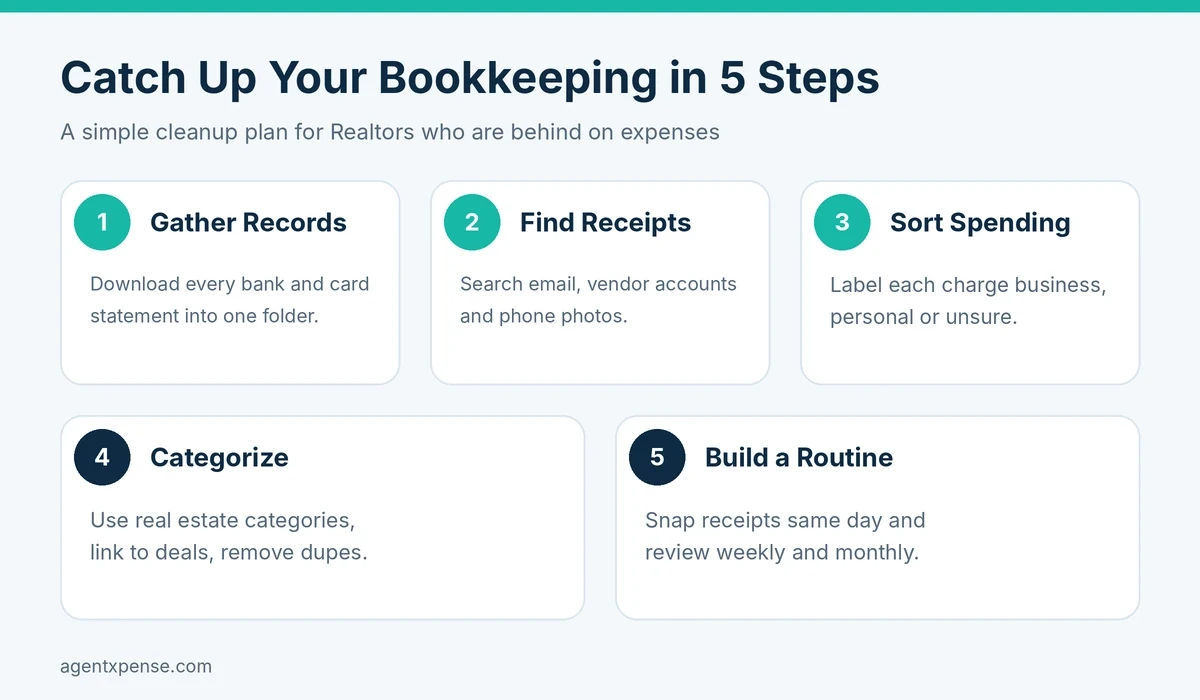
Here's a five-step process to get your books current without turning the cleanup into another full-time job.
Gather bank and credit-card records
Find missing and lost receipts
Separate business from personal transactions
Categorize expenses and remove duplicates
Build a simple monthly bookkeeping routine
If you're only a month or two behind, the cleanup may take a few focused sessions. If your backlog covers six months, a year, or longer, work through it one month at a time rather than trying to fix everything at once.
Catch-up bookkeeping means bringing incomplete or outdated financial records up to date.
For a real estate agent, that usually means matching bank and credit-card charges with receipts, separating business spending from personal purchases, categorizing business expenses, connecting costs to specific deals, confirming that commission income is recorded, and organizing everything for your accountant.
The goal is to turn a pile of transactions and receipts into a clear record of what happened in your business. Once the backlog is cleared, a short weekly and monthly routine can keep it from building up again.
A quick example: Imagine an agent who closed three deals in the spring and hasn't opened her books since March. By September, she has six months of bank activity, a camera roll full of receipt photos, and a credit card that mixes client lunches with groceries.
She doesn't need to remember everything. She needs a starting point—her statements—and a clear order of work.
That's what the steps below provide.
Start with your bank and credit-card statements. They give you a complete list of the transactions that passed through your accounts, including purchases for which you no longer have the original receipt.
Collect every account you used for business:
Business checking
Business credit cards
Personal cards used for business purchases
The account where your commission is deposited
Accounts that pay recurring business expenses
Download statements for the entire period you're cleaning up.
If your bank offers CSV or Excel files, save those too. They make sorting and importing easier. PDF statements are still useful when that's the only format available.
Create one cleanup folder and organize the files by account and month, for example:
Bookkeeping Cleanup → [Year] → September → Business Checking
Bookkeeping Cleanup → [Year] → September → Business Credit Card
At this stage, focus on collecting records rather than categorizing every transaction.
Once your statements are together, compare the transactions with the receipts and invoices you already have.
Realtor receipts can end up in many places because so much business happens away from a desk.
Where to look | What you may find | Quick tip |
Receipts, invoices, order confirmations | Search "receipt," "invoice," "payment," and "order confirmation" | |
Vendor accounts | MLS, printing, photography, staging, and software invoices | Check billing or order history |
Phone photos | Receipts photographed on the go | Search your photo library for "receipt" |
Cloud storage | Scans and downloaded invoices | Check Downloads and Scans folders |
Bank and card statements | Vendor, date, and amount | Use them to flag transactions that need documents |
Physical files | Paper receipts and invoices | Photograph them as you find them |
Don't forget recurring charges. Software subscriptions, marketing services, association dues, and other recurring expenses are easy to overlook when you're working backward through several months.
Start with what you can verify.
Your statement shows the vendor, date, and amount. You may be able to get a copy from the vendor, find an email confirmation, or locate the purchase in your online account.
If you still can't fully document an expense, write down what you know about it and ask your accountant what supporting records are appropriate. Requirements vary by expense and jurisdiction, so it's better to confirm uncertain items than to assume.
Don't create a new pile while cleaning up the old one.
Photograph or upload each receipt when you find it and keep it with the related transaction.
Now go through the transactions and sort them into three groups:
Business: Clearly related to your real estate business, such as advertising, MLS fees, business software, professional services, listing photography, and office supplies.
Personal: Unrelated to the business. Keep these out of your business expenses.
Needs review: You're not sure whether it's business-related or whether special rules apply. Keep these separate until you've confirmed with your accountant.
This step matters most when a personal card has been used for business purchases. It's much easier to identify those charges now than to try to remember six months later why a particular transaction appeared on the statement.
As you work through your statements, watch for categories that commonly appear in a real estate business:
Marketing & Advertising
MLS & Association Dues
Vehicle Expenses
Office Rent & Supplies
Phone/Fax/Internet
Meals & Entertainment
Home Office Deduction
Selling Expense
Education, Seminar & Training
Technology & Equipment
Interest & Bank Charges
Legal & Professional Fees
Misc
The tax treatment of an expense depends on your circumstances and jurisdiction. Bookkeeping software organizes the transaction; your accountant or tax professional determines how it should be treated for tax purposes.
After separating business from personal transactions, categorize the business expenses.
A category structure built around real estate makes it easier to understand where your money goes than a long list of generic categories.
When an expense relates directly to a particular transaction, connect it to that deal.
For example, say one listing generated:
$450 for photography
$700 for staging
$120 for advertising
That's $1,270 in marketing-related costs for that listing. Tracking those expenses against the deal gives you a clearer picture of what it actually cost to market and close the transaction.
Duplicates are common during a cleanup because the same purchase can appear as a bank transaction, receipt photo, emailed invoice, or imported transaction.
Before entering an expense twice, compare the:
Vendor
Date
Amount
If two records represent the same purchase, keep one and remove the duplicate.
There's no single answer because the workload depends on how many transactions you have, how complete your records are, and how many months you're behind.
As a rough way to plan the work:
1–2 months behind: You may be able to clear the backlog in a few focused sessions.
3–6 months behind: Work month by month and prioritize statements, missing receipts, and uncategorized transactions.
6–12 months behind: Break the cleanup into smaller periods and consider working with a bookkeeper or accountant if the records are complex.
The more transactions and missing documentation you have, the longer the cleanup will take. The important part is having a repeatable process instead of trying to solve everything at once.
Once the backlog is cleared, make bookkeeping part of your regular workflow.
Capture receipts as they arrive. Take a photo or upload the receipt when you get it instead of leaving it in your car, wallet, or inbox.
Spend 10 minutes each week. Review new transactions and deal with the obvious ones while they're still fresh.
Do a 30-minute monthly review. Check for missing receipts, uncategorized transactions, and duplicate charges. Confirm that business and personal spending are separated, business income is recorded, and deal-related costs are linked.
Look at your numbers. Clean books tell you more than what you need at tax time. They can show which deals cost the most to close, where your marketing money goes, and which recurring expenses you may no longer need.
The routine doesn't need to take hours. Consistency is what keeps a small backlog from becoming another major cleanup.
Being behind doesn't mean your business is poorly run. Real estate is a busy, mobile business, and bookkeeping is often the task that gets postponed when clients and closings come first.
Commission income arrives around closings rather than on a regular schedule, which can make regular reviews easy to skip. You work from your car, so receipts end up in your phone or glovebox. Personal and business spending may share one credit card. And generic bookkeeping tools don't always match how agents work when expenses need to be organized around listings and deals.
You likely have a bookkeeping backlog if:
You can't identify some bank charges.
Your receipts are scattered across your phone, email, and paper files.
Your accountant keeps asking for missing documents.
You have months of uncategorized transactions.
You aren't sure how much individual deals actually cost.
Catching up gives you a clearer record of what happened in your business. Whether you file with the IRS in the US or the CRA in Canada, organized records can make it easier to find expenses and understand the financial side of your business.
Both agencies publish record-keeping guidance, and your tax professional can tell you exactly what to keep for your situation.
AI can make catch-up bookkeeping faster by handling repetitive data-entry work.
Instead of manually typing details from every receipt, an AI-powered bookkeeping tool can read information such as the vendor, date, and amount, suggest a category, and help organize imported transactions.
You still review the results before they become part of your records.
AgentXpense is built specifically around how real estate agents manage expenses, income, commissions, and deals.
Upload receipts: AI reads details such as the vendor, date, and amount and pre-fills the expense form.
Import old statements: Import CSV, Excel, or PDF statements. AI can help map columns and extract transactions, including supported scanned PDFs. Imported items go to a review queue before they're added to your records.
Categorize faster: Realtor-specific expense categories are built in, while AI can suggest categories based on the vendor and your previous categorization choices.
Catch duplicates: Potential duplicates can be identified using vendor, amount, and date information. The system also remembers decisions you've made about entries that should remain separate.
Link expenses to deals: Connect expenses to specific deals so you can see the costs associated with each transaction.
Track commission income: When you enter commission details on a closed deal, AgentXpense automatically creates the corresponding commission income record.
Prepare records for your accountant: Reports, CSV exports, and bulk receipt downloads can make record handoff easier.
Paid plans also support bank connections with weekly transaction syncing, so new transactions can flow into the same review workflow.
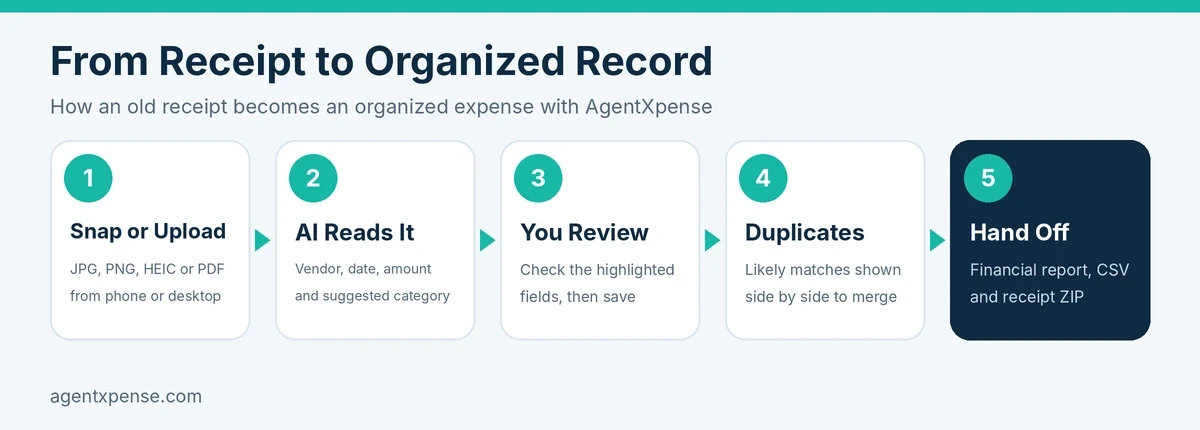
Start with your bank and credit-card statements. Then find missing receipts, separate business from personal transactions, categorize expenses, check for duplicates, and organize the finished records.
Once you're caught up, use a short weekly and monthly routine to stay current.
Search your email, vendor accounts, phone photos, cloud storage, and physical files.
Use your statements to identify transactions that need documentation. If a receipt can't be recovered, record what you can verify and ask your accountant what supporting documentation is appropriate.
It depends on the expense, your circumstances, and the rules where you file.
A missing receipt doesn't automatically settle the question either way. Keep the supporting records you have and ask your tax professional about anything with incomplete documentation.
Start with the period that's currently incomplete and work backward if older records also need attention.
If you're considering changing information on a tax return that has already been filed, talk to your accountant first.
Yes. AI can handle repetitive tasks such as reading receipts, suggesting categories, mapping imported data, and organizing transactions.
For agents with months of transactions to process, that can reduce the amount of manual data entry required.
No. You can track vehicle expenses such as gas and repairs, but keep your mileage log in a spreadsheet or dedicated mileage app.
The basic bookkeeping workflow is similar for Realtors in both the US and Canada: gather your statements, collect receipts, separate business and personal transactions, categorize expenses, and keep your records organized.
The main differences are in tax treatment, sales tax requirements, and record-keeping rules. The IRS provides guidance for US businesses, while the CRA provides guidance for Canadian businesses. Because tax rules can vary by country, state, province, and individual situation, use your bookkeeping software to organize your records and check with a qualified tax professional for tax-specific decisions.
AgentXpense is designed to support real estate agents in both the US and Canada, while helping you keep expenses, receipts, income, and deal-related records organized.
Capture receipts as they arrive, spend a few minutes each week reviewing new transactions, and do a monthly check.
Keep business and personal spending separate. A bookkeeping tool that reads receipts and suggests categories can also reduce the amount of manual work involved in staying current.
Being months behind on bookkeeping can feel overwhelming when you're already juggling listings, clients, showings, and closings. The way out is to take it in order:
Start with your bank and credit-card statements.
Recover the receipts you can.
Separate business from personal transactions.
Categorize expenses, remove duplicates, and connect relevant expenses to deals.
Build a routine that is simple enough to maintain.
If repetitive data entry is what keeps you behind, AgentXpense can help by reading receipts, suggesting categories, importing transactions, and organizing expenses around your real estate business.
Ready to clear your bookkeeping backlog? Start your free 30-day AgentXpense trial. No credit card required.
Disclaimer: This article is for general information only and isn't tax, legal, or accounting advice. Rules vary by country, state, province, and individual situation, so please check with a qualified accountant or tax professional.
Should Realtors keep their books by hand, hire a bookkeeper or use AI? Compare the options on cost, time and accuracy before you decide.

Stop spending your 11 p.m. evenings sorting faded receipts. Learn exactly what AI bookkeeping can automate for real estate agents, where your human review still matters, and how Agent Xpense saves you hours of manual work.

Wondering how much a Realtor should set aside for taxes? There is no fixed percentage. Learn how to calculate your tax reserve, track deductible expenses, and handle US & Canada taxes easily.
2255 Dundas Street West, Suite 207 Mississauga, ON L5K 1R6
© Agent Xpense Inc. All rights reserved.