It's 11 p.m. You closed a deal today, but instead of switching off, you're squinting at a faded receipt, trying to remember what you bought and why. Then there's the bank statement to sort, the expenses to categorize, the transactions to match. The workday ended hours ago. The bookkeeping didn't.
That's the exact problem Agent Xpense was built to solve. It's bookkeeping software for real estate agents with AI-assisted workflows, designed so you spend less time on data entry and more time selling.
So when someone pitches you AI bookkeeping for real estate agents, you're probably skeptical. Can AI really do your bookkeeping?
Yes—but mainly the repetitive parts. AI can assist with tasks such as extracting receipt details, suggesting categories, importing statements, and flagging potential duplicates, while you review and approve the results. Think of it as a hybrid: AI brings the speed, and you keep the oversight that makes your records organized and easy to check.
Start your 30-day free trial — no credit card required.
In this guide, we'll break down exactly what AI handles in automated bookkeeping for real estate, where your review still matters, and how to build a bookkeeping workflow that cuts the repetitive work without costing you control of your records.
What Can AI Bookkeeping for Real Estate Agents Automate?
AI is at its best with work that's repetitive, structured, and eats up time. For real estate agents, AI-assisted bookkeeping can help with four repetitive areas: receipts, categories, statement imports, and duplicate detection. The rule is the same for all four: AI does the data prep, you give the final approval. The payoff? Less typing, less sorting, and more of your evening back.
AI Receipt Scanning
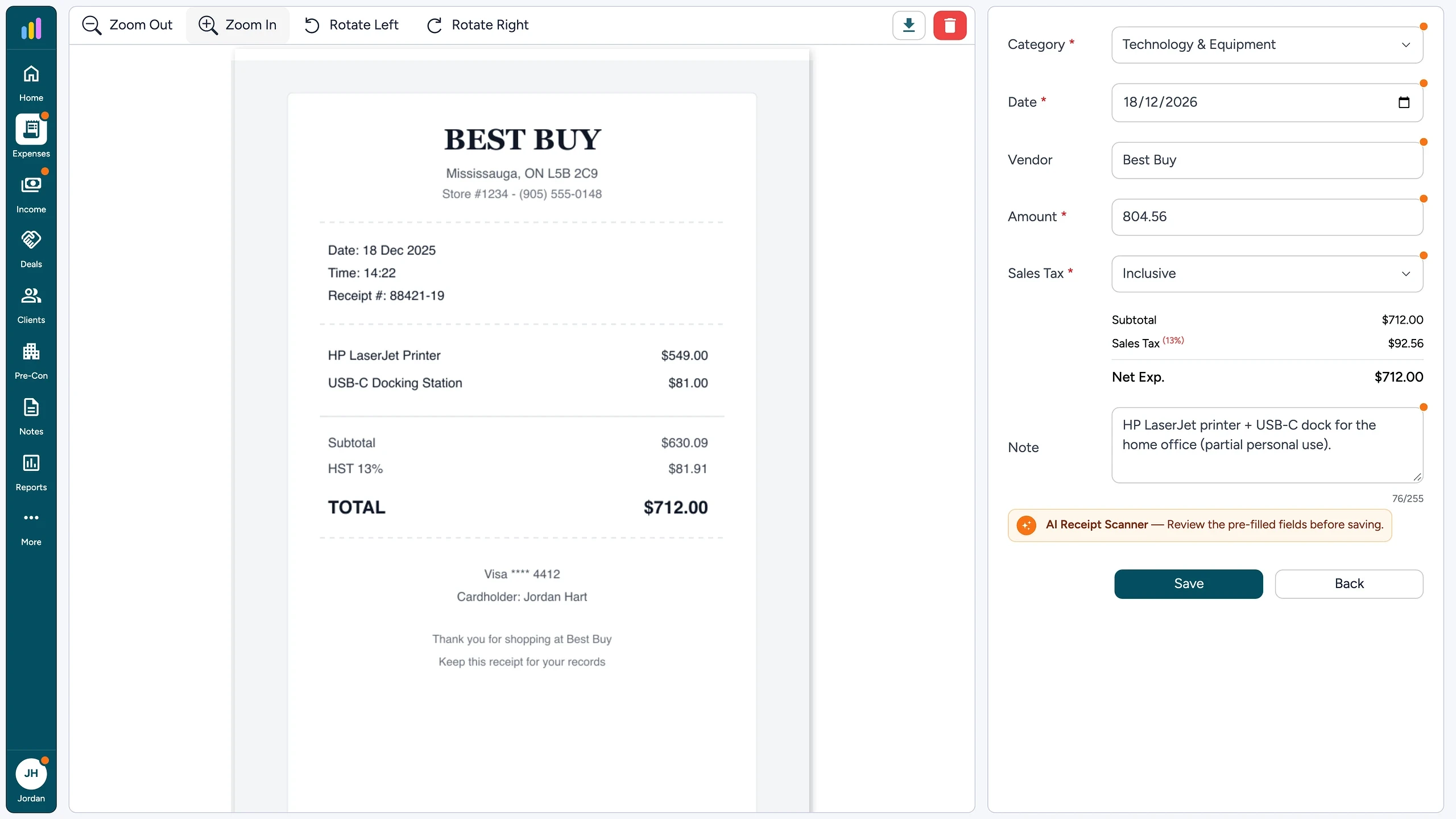
Snap a photo of a receipt after a client lunch and upload it as a JPG, PNG, HEIC, or PDF. OCR (optical character recognition) turns the image into text a computer can read. Then AI extracts the vendor, date, amount, and a note or description, plus the tax type when it's detectable, and pre-fills the expense form. Every AI-filled field gets an orange indicator, so you know exactly what to check and edit before you save. Treat the results as a starting point: verify the amounts, dates, and categories before saving. Instead of typing every receipt by hand, you review a form that's already filled in.
AI Expense Categorization
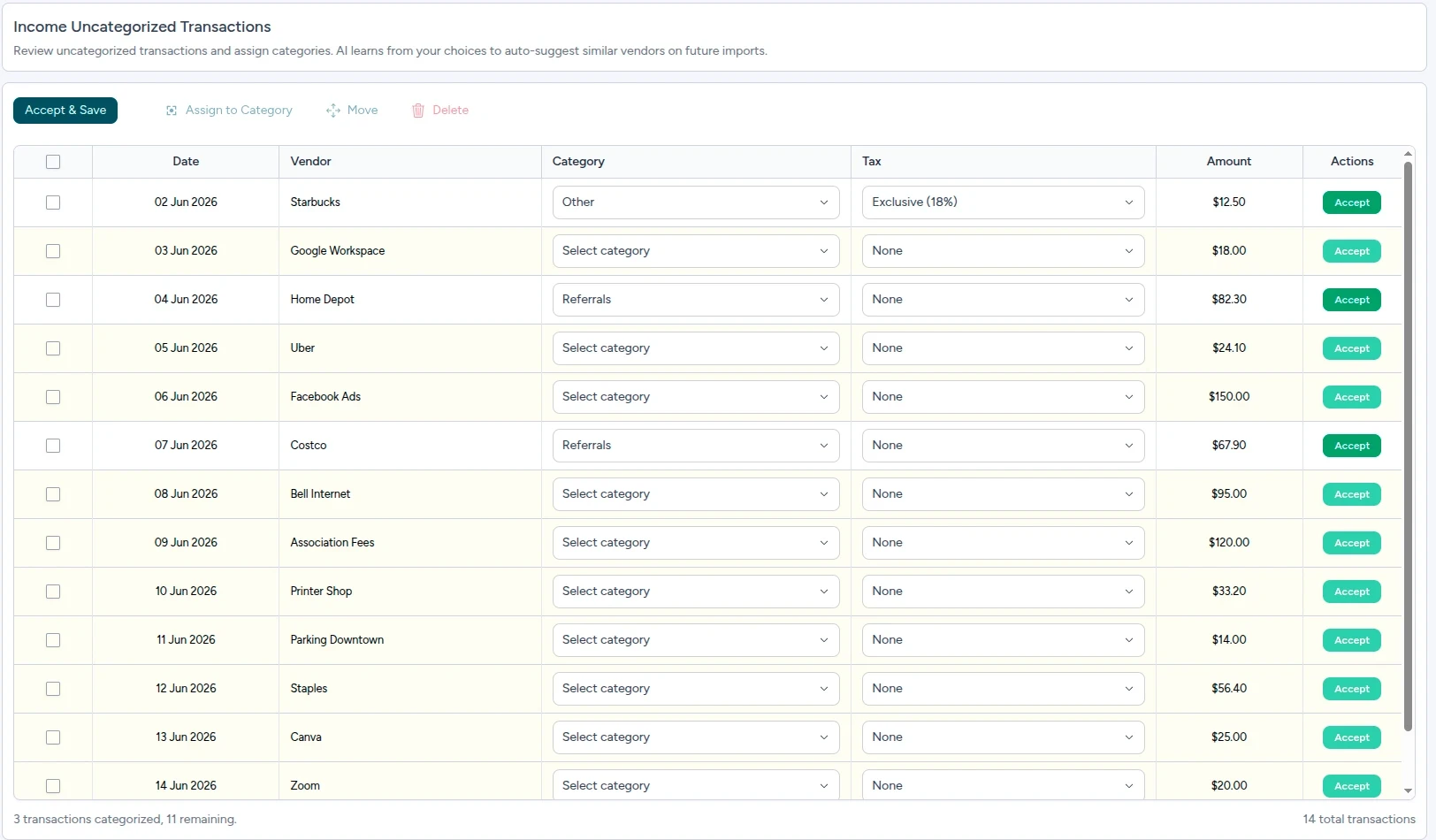
Bank descriptions are a mess. "HomeDepot 1234" and "The Home Depot" are the same store wearing different names. AI uses context-aware matching against your own vendor history to connect the dots, so suggestions get sharper the more you use it. Each suggestion comes with a confidence level: High, Medium, or Low. When a match is High confidence, the category is applied automatically. Medium and Low suggestions are shown for you to confirm. It works on scanned receipts, Plaid transactions, CSV and PDF imports, and in the Transaction Review queue, and you still review the results before they're saved. Less guesswork. Less scrolling through cryptic bank descriptions.
Statement Imports
Every bank exports its data differently. With CSV and Excel files, AI reads your column headers and suggests how to map date, vendor, amount, debit, credit, and notes. With PDF statements, OCR reads the document and AI extracts the transactions directly (some predictable, structured PDFs are parsed with rule-based logic instead). Either way, no copy-and-paste.
Statement upload is included in the free trial. Bank connections through Plaid are available on paid plans only. They use read-only access, so Agent Xpense can see transactions but can't move money, and connected accounts sync weekly.
Duplicate Detection
Say you scan a receipt on Tuesday, and the same charge shows up in your bank import on Friday. AI compares the vendor, amount, and date, spots the likely match, and shows both transactions side by side so you can merge them or keep them separate. Pick Keep Separate, and Agent Xpense remembers that decision for that specific pair, so it doesn't keep flagging it. It helps prevent duplicate or double-counted expenses, and you don't have to answer the same question twice.
What AI Can't Decide Without Review
AI prepares your bookkeeping information fast. But some calls need context that only you (or your tax professional) have. A quick review in these spots keeps things right before a transaction becomes part of your books:
Ambiguous Purchases: You grab supplies at a big-box store. Staging materials for a listing, or stuff for your house? AI suggests a category, but you know the real reason.
Personal vs. Business Charges: A client dinner and a family dinner look identical on a bank statement. A quick look makes sure each one is recorded the right way.
Tax Treatment: Whether tax is included in the total or added on top changes how it's recorded. AI picks up tax information from the receipt when it can, and you confirm the tax type (None, Inclusive, or Exclusive) that fits the purchase.
Unusual Transactions: A one-time equipment purchase or a legal fee deserves a closer look before it goes into your books.
Final Tax Interpretation: Whether an expense is deductible depends on your situation and the tax rules where you file. That call belongs to you and your qualified tax professional. Not the software.
Here's where that review sits when you import data:
Statement or bank connection → AI column mapping (CSV/Excel) or OCR + AI extraction (PDF) → Transaction Review → Approve
The goal isn't to replace your judgment. It's to make it easier. AI handles the repetitive prep, and you review the transactions that need context. That gives you a real chance to catch wrong amounts, wrong categories, or duplicates before they touch your reports.
AI vs. Human Review in Bookkeeping (The Hybrid Model)
Bookkeeping automation for real estate agents works best as a hybrid model, where each side does what it's good at. AI handles repetitive tasks like extracting information, spotting patterns, and preparing transactions. You bring the context, the review, and the final approval. Here's how that split looks across common bookkeeping tasks:
Task | AI Automates/Assists? | Needs Human Review? | Who Does It? |
|---|
Receipt extraction | ✅ Yes: extracts vendor, date, amount, note/description, and tax type, when detectable | ✅ Yes: review the extracted details, especially when receipt information is unclear | AI prepares, you confirm |
Expense categorization | ✅ Yes: suggests categories based on transaction context and previous activity | ✅ Yes: review new or ambiguous transactions | AI suggests, you decide |
Statement import | ✅ Yes: maps columns for CSV/Excel files; extracts transactions from PDFs using OCR and AI | ✅ Yes: review the mapping or extracted transactions before approving | AI maps or extracts, you approve |
Duplicate detection | ✅ Yes: identifies potential matches using details such as vendor, amount, and date | ✅ Yes: decide whether to merge or keep transactions separate | AI flags, you decide |
Commission/deal tracking | ⚙️ Assists: organizes deal and commission information and incorporates it into reports | ✅ Yes: enter and verify net pay, received date, commission, and brokerage deduction | You enter and verify, software organizes |
Tax filing | ❌ No | ✅ Yes | You and your qualified tax professional (outside Agent Xpense) |
Final tax interpretation | ❌ No | ✅ Yes | You and your qualified tax professional |
The first four tasks are where AI takes on most of the repetitive prep, so your time goes to the decisions only you can make. Commission and deal tracking mixes software organization with information you provide. Tax filing and final tax interpretation stay outside the software's role.
How Agent Xpense Applies This Workflow for Realtors
Real estate bookkeeping goes beyond everyday expenses, which is why a bookkeeping workflow for real estate agents has to handle more than receipts. You're tracking commission income, brokerage deductions, deal-related expenses, and payments that arrive over time. Agent Xpense puts expenses, income, commissions, deals, and reporting in one place, using the hybrid model above, so you're not juggling spreadsheets, receipt folders, and scattered notes.
Imported Transactions Stay in Review Until You Approve Them
Every imported transaction, whether it comes from a CSV file, an Excel file, a PDF, or a connected bank account, lands in the Transaction Review queue before it touches your records. AI suggests a category, you select the tax type, and you decide what happens next: accept, reclassify, or delete, one at a time or in bulk. Imported transactions don't become part of your bookkeeping records until you review and approve them.
Why does that matter? Because you're not blindly trusting a robot. You get a review queue that lets you catch errors before they reach your reports, so your records are cleaner when tax time comes.
Deals, Commissions, and Pre-Con Tracking
Agent Xpense tracks deals as Active, Pending, or Closed. When a deal closes, you record the net pay, received date, agent commission, and brokerage deduction, and the commission flows into Income → Commissions and your Reports. Link expenses to individual deals and every deal gets its own paper trail. For new construction, Pre-Con projects support up to four payment tranches, so commission payments that arrive in installments stay organized instead of scattered across notes and spreadsheets.
Built on 13 Default Expense Categories
You don't start with a blank category list, and you don't burn your first week building one. Agent Xpense includes 13 expense categories from day one, designed around common Realtor expenses:
Marketing & Advertising, MLS & Association Dues, Vehicle Expenses, Office Rent & Supplies, Phone/Fax/Internet, Meals & Entertainment, Home Office Deduction, Selling Expense, Education, Seminar & Training, Technology & Equipment, Interest & Bank Charges, Legal & Professional Fees, Misc.
Note: Vehicle Expenses is a category for recording vehicle-related costs. It is not a mileage-tracking feature.
Tax-Time Reports and Receipt Exports
Tax season shouldn't mean digging through inboxes and shoeboxes. When it rolls around, pick a date range in Reports to review income, expenses, net income, commissions, and deals, along with sales tax received, sales tax on expenses, and your payable or refund position. Those are summaries of the data you've recorded, not a determination of your legal tax liability, so go over them with your qualified tax professional. Print the main Reports page for your accountant, or export Expenses, Income, or Commissions separately as CSV files. Bulk receipt downloads bundle matching receipts into a single ZIP file, so you can hand over your supporting documents in one download.
Agent Xpense works for US and Canadian agents and keeps your tax-related records organized. It applies the sales tax rate you set in your profile to calculate tax on expenses and income, and you record tax as None, Inclusive, or Exclusive on each transaction.
Agent Xpense helps organize your tax-related records for tax time. It does not file taxes or provide accounting or tax advice. For questions about tax treatment or filing requirements, consult a qualified tax professional.
Why Agent Xpense Is Built for Real Estate Agents
Here's the honest version. Spreadsheets and general accounting software are designed to work for any business. You can set them up for real estate, but brokerage deductions, deal-linked expenses, and Pre-Con commission tranches aren't built in from the start. You'd be creating the categories, structure, and receipt filing system yourself.
Agent Xpense starts from those real estate workflows instead: 13 default expense categories, deal and commission tracking, AI receipt scanning, and a review-first workflow in one place. It's a focused tool, not a full accounting suite. There's no invoicing module and no full bank reconciliation, so if you need those, you'll want another tool alongside it.
Stop doing manual data entry. Upload your first receipt and watch Agent Xpense do the typing for you.
After your trial, Agent Xpense is $14/month, or $119.88/year ($9.99/month equivalent, about 25% savings). All paid plans include the same features. That's less than a single client lunch, and a small price for getting your evenings back.
Who Is AI-Assisted Bookkeeping Best For?
AI-assisted bookkeeping for real estate agents is especially useful if you want less repetitive bookkeeping without giving up control of your financial records.
It's a good fit for:
Solo agents who manage their own books and want to spend less time on manual data entry.
Agents with a high volume of receipts, including client meals, staging, signage, marketing, and other business expenses.
Agents catching up on bookkeeping who want a cleaner process for reviewing and categorizing transactions.
Agents who work with a tax professional and want organized records and receipts ready to share.
When You Shouldn't Rely on AI Alone
Some situations call for professional eyes, too:
Your tax situation is complex. Multiple income sources, unusual expenses, or activity across different jurisdictions call for professional guidance.
You mix personal and business spending. Similar transactions need context about the purpose of the purchase, so review them before recording.
You're unsure how an expense should be treated. An AI category suggestion helps organize a transaction. It isn't a determination of tax deductibility.
You're filing your taxes. Bookkeeping software organizes your records, but filing decisions belong to you and, when appropriate, your qualified tax professional.
Even then, organized records and receipts that are ready to share make your tax professional's job easier. The hybrid model works either way: AI handles the repetitive prep, and you supply the context and final approval. You get the efficiency of automation and keep control of your financial records.
Frequently Asked Questions
Can AI completely replace a bookkeeper?
No. AI automates data entry, categorization suggestions, statement mapping and extraction, and duplicate flagging. It can't replace human judgment on deductions, tax treatment, or final approval. If your finances are complex, you may still want a bookkeeper or tax professional involved.
How does AI bookkeeping keep you in control?
Agent Xpense uses a review-first workflow. AI-filled receipt fields are marked with orange indicators, and imported transactions stay in Transaction Review until you accept them. Bank connections use read-only Plaid access, so the software can see transactions but can't move money.
Can AI categorize real estate expenses?
Yes. AI expense categorization suggests categories by matching vendors to your history, even when names contain typos or store numbers. High-confidence matches are applied automatically, so review the results, and confirm Medium and Low suggestions, new vendors, and ambiguous purchases.
Can AI scan and read receipts?
Yes. AI receipt scanning combines OCR and AI to extract the vendor, date, amount, and a note or description from photos and PDFs, along with the tax type when it's detectable. Review the AI-filled fields and correct them when necessary before saving.
Does Agent Xpense file taxes?
No. Agent Xpense organizes your financial data for tax time, but it does not file taxes, give tax advice, or replace a qualified tax professional.
How much does Agent Xpense cost?
Every account starts with a 30-day free trial for $0, and no credit card is required. After that, it's $14/month, or $119.88/year ($9.99/month equivalent, about 25% savings). All paid plans include the same features. Bank connections through Plaid are available on paid plans only.
Is AI bookkeeping good for solo real estate agents?
Yes, especially if you handle your own books. AI receipt scanning, category suggestions, and statement import cut the repetitive work, and the review step keeps you in control. If your finances are complicated, bring a tax professional into the process.
Conclusion
The real question is how much of your bookkeeping workflow you want AI to handle. Agent Xpense scans your receipts, suggests categories, and prepares your imports, while you review the results. You review and approve imported transactions before they become part of your bookkeeping records. Every hour you don't spend typing receipts is an hour you can spend with clients.
The easiest way to find out whether this approach fits your workflow? Try it on your own receipts.
Claim your 30-day free trial today—no credit card required. Spend less time on books and more time closing deals.Plans after the trial: $14/month, or $119.88/year ($9.99/month equivalent, about 25% savings). All paid plans include the same features.